EducationSoftwareStrategy.com
StrategyCommunity

Knowledge Base

Product

Community

Knowledge Base

TopicsBrowse ArticlesDeveloper Zone

Product

Download SoftwareProduct DocumentationSecurity Hub

Education

Tutorial VideosSolution GalleryEducation courses

Community

GuidelinesGrandmastersEvents
x_social-icon_white.svglinkedin_social-icon_white.svg
Strategy logoCommunity

© Strategy Inc. All Rights Reserved.

LegalTerms of UsePrivacy Policy
  1. Home
  2. Topics

KB439862: 'api-ms-win-crt-string-l1-1-0.dll is missing' error appears when trying to install MicroStrategy 10.x


Community Admin

• Strategy


This article contains the cause of the error and troubleshooting steps to resolve it.

SYMPTOM
The following error appears when trying to install Strategy 10.x in Windows environment:
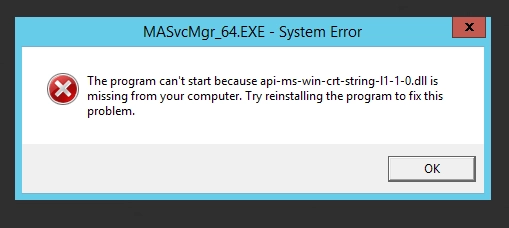
ka04W000000ObkfQAC_0EM44000000YW8L.png

CAUSE
api-ms-win-crt-string-l1-1-0.dll is missing due to Update for Universal C Runtime in Windows has not been installed.
ACTION
Download and install Universal C Runtime update package from the following Microsoft page:
Update for Universal C Runtime in Windows 
In case if the error persists after the installation of the update package, register the DLL in question and its dependencies manually as per KB11873
Please find the zip archive with DLLs attached below. KB439862


Comment

0 comments

Details

Knowledge Article

Published:

March 7, 2018

Last Updated:

November 12, 2018