SYMPTOM:
In Strategy Web 10.x, there is a web preference to show all available schedules in a project or allow for users to subscribe to only a list of selected schedules. This web preference, shown in the image below, can be found in the Web Preferences under Project Defaults > Schedule. By default, the “Allow users to subscribe to all schedules.” is selected.

However in Strategy Web 10.x, users are still able to see the entire list of schedules when scheduling the refresh of an intelligent cube even when only selected schedules are chosen in the Web Preferences.
Consider that only the schedule First of Month is selected, as shown below:
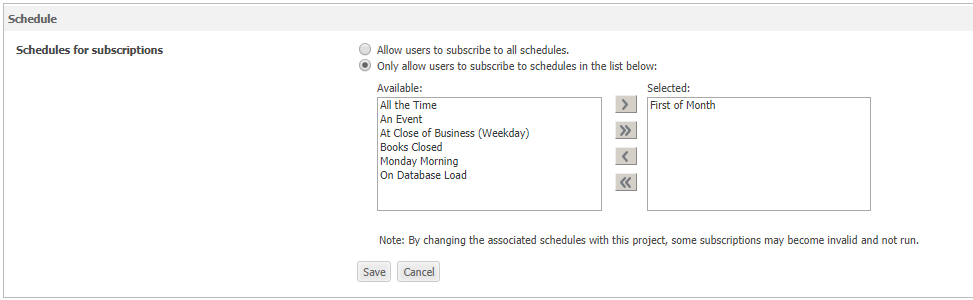
If the schedule is for an intelligent cube, all schedules are still visible.

This allows users to select schedules they shouldn't be able to and gives them no warnings that this process may result in failure. If a schedule is chosen that is not enabled in the Web Preferences, the refresh of the intelligent cube will simply never occur.
This issue does not happen with regular reports or documents that are not based on intelligent cubes. When subscribing to a report or document, only the selected schedules in the Web Preferences are available, as expected.
STEPS TO REPRODUCE:
Follow these steps to reproduce the issue in a Strategy Tutorial Project.


CAUSE:
This is an identified defect in Strategy Web 10.x.
ACTION:
Currently this issue is still being reviewed for feasibility by our Technology team and it is not scoped for any upcoming scheduled Strategy release.
The Strategy Internal Reference Number for this issue is: KB439874
