EducationSoftwareStrategy.com
StrategyCommunity

Knowledge Base

Product

Community

Knowledge Base

TopicsBrowse ArticlesDeveloper Zone

Product

Download SoftwareProduct DocumentationSecurity Hub

Education

Tutorial VideosSolution GalleryEducation courses

Community

GuidelinesGrandmastersEvents
x_social-icon_white.svglinkedin_social-icon_white.svg
Strategy logoCommunity

© Strategy Inc. All Rights Reserved.

LegalTerms of UsePrivacy Policy
  1. Home
  2. Topics

KB439888: Configurable Port Number for the Data Wrangling Service in MicroStrategy 2021


Community Admin

• Strategy


This KB article provides details on how to configure the port for the Data Wrangling Service in MicroStrategy 2021

INTRODUCTION
The port number for the Data Wrangling Service i.e., the  MJRefSvr_64 Refine Server process is user-configurable. In older Strategy versions (before version 10.11 and 10.4 Hotfix7), the process used the default value of 3333 and was not configurable. 
This feature will be useful in Strategy deployments which are not able to use the port 3333 for administrative or security reasons, increasing the usability of the MJRefSvr_64 process. 
The port can be configured through a registry setting in Windows environments or by editing the MSIReg.reg file in Linux/Unix environments. 
The following factors need to be considered before setting a port for the Refine Server process: 

  • The value should be set to a positive integer no greater than 65535
  • The value should be different than the port used by the Intelligence Server (default value 34952)
  • Any other invalid value will cause the MJRefSvr_64 process to use the default value of 3333
  • If the specified port is occupied, the process will try increasing port values until an open port is found


​If the registry/MSIReg settings are not changed at all from the out-of-the-box values, the process will use the default port value of 3333.
Steps for Windows Operating Systems
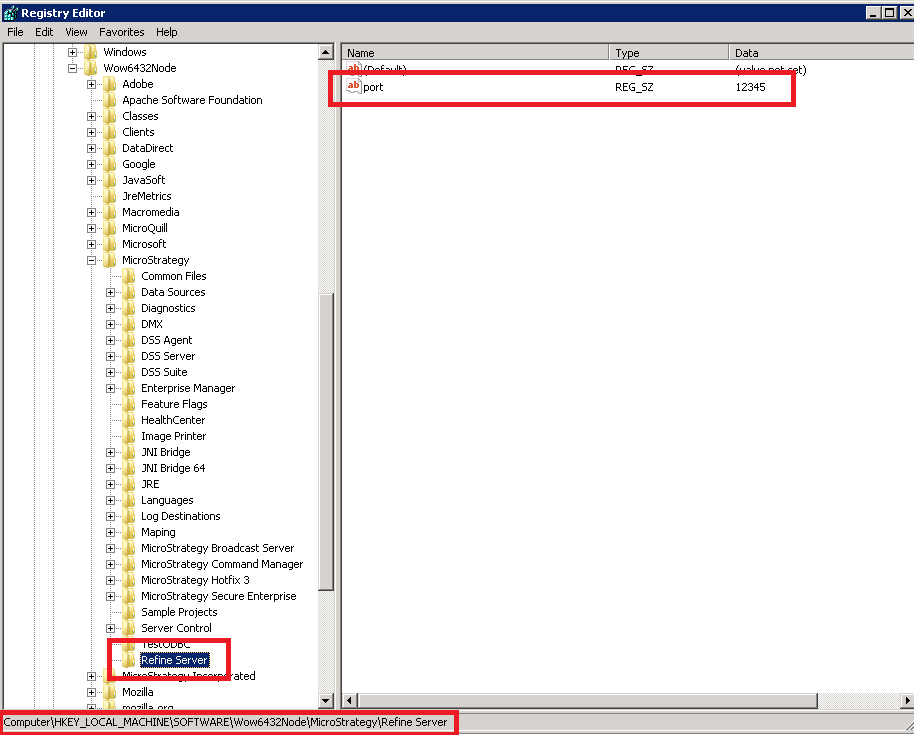
  1. Type 'regedit' on the Windows run menu to access the Windows  registry,
  2. Navigate to the key HKEY_LOCAL_MACHINE\SOFTWARE\Wow6432Node\Strategy, and create a new Key called "Refine Server"
  3. Add a new string value under this key called "port" and modify it to give it the desired value. A screenshot of the completed configuration is below:
ka0PW0000000hBRYAY_0EM44000000YWVF.png

Steps for Linux Operating Systems

  • Stop the Strategy Intelligence Server and make a backup of the MSIReg.reg file found in the home folder of the Strategy installation.
  • Edit the MSIReg.regi file to add the following lines (with the desired port number instead of 12345):
    
    [HKEY_LOCAL_MACHINE\SOFTWARE\MicroStrategy\Refine Server]
    "port"="12345"


    Below is a screenshot of the edited MSIReg.reg file:
ka0PW0000000hBRYAY_0EM44000000YWV0.png

Registry Modification:
WARNING: 
Modifying registry values incorrectly may cause serious, system-wide problems that may require the re-installation of Microsoft Windows or Strategy Product Suite. Any edit of the registry is done at the user's own risk. Since these are user-initiated changes, they are not covered by any Strategy warranty. If using Microsoft Windows, the user should backup the registry and/or update an Emergency Repair Disk (ERD) prior to alterations. 


Comment

0 comments

Details

Knowledge Article

Published:

March 30, 2018

Last Updated:

February 13, 2024