SYMPTOM:
When using Strategy Web with Internet Explorer there is a noticeable difference in performance when compared to Google Chrome in the same scenario. Usually, Chrome performs better than Internet Explorer.
CAUSE:
This issue is not caused by Strategy Web. By default, Internet Explorer has a master process that runs in x64 bit mode, and every other tab opened runs in a separate process in x86 bit mode. This can be confirmed when opening the Windows Task Manager, as shown below:
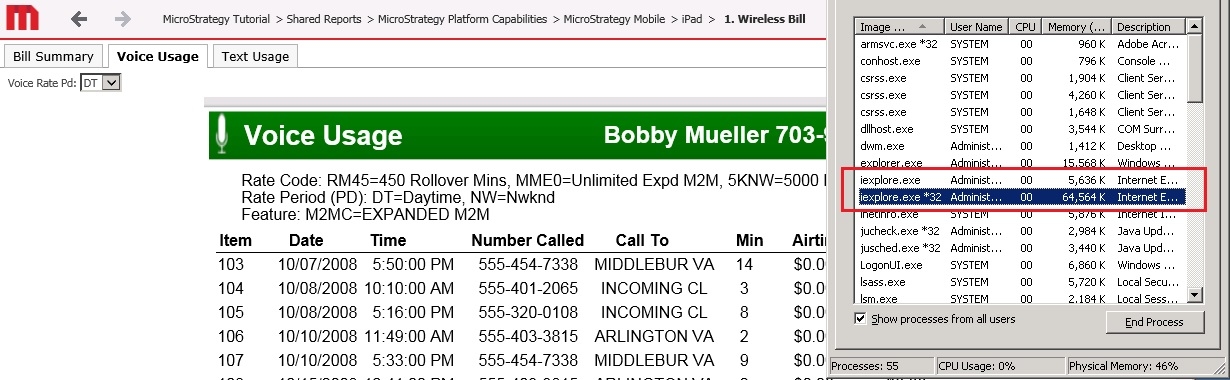
Notice in the image above, there is one process called iexplorer and another one called iexplorer *32, which represents a 32 bit process.
In Chrome, the behavior is different. All processes are x64 bit, independently of it being a master process or just a tab process, as shown below:
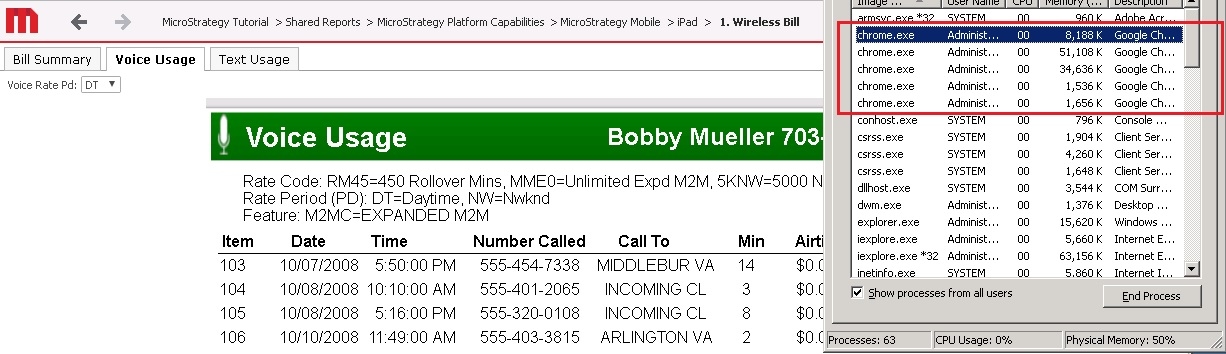
These x86 bit processes per tab are why Internet Explorer is slower than Chrome.
Microsoft included a registry key setting with the browser to modify its behavior as explained in this Microsoft Article.
This registry key change makes Internet Explorer run in only one process for all tabs, rather than each tab in its own separate 32 bit process. Thus all tabs run under the master process. Since the master process is x64 bit, the performance would improve to that similar of Chrome, if Internet Explorer has only 1 tab open. As more tabs are open the tabs will share the resources of that one x64 bit process and the performance will start to fall off.
ACTION:
To change the behavior of Internet Explorer to use the 64 bit master process for all tabs follow these steps.
Note: following best practices, make a backup of the registry before modifying it.
HKEY_CURRENT_USER
or
HKEY_LOCAL_MACHINE

\Software\Microsoft\Internet Explorer\Main\TabProcGrowth
The instructions above are as per the Microsoft article described here.
Note: if there are more tabs of Internet Explorer open than cores of the CPU, processes/threads switching could be expensive.
THIRD PARTY SOFTWARE INSTALLATION WARNING:
The third-party product(s) discussed in this technical note is manufactured by vendors independent of Strategy. Strategy makes no warranty, express, implied or otherwise, regarding this product, including its performance or reliability.
The Strategy Internal Reference Number for this issue is: KB439961.
KB439961
