EducationSoftwareStrategy.com
StrategyCommunity

Knowledge Base

Product

Community

Knowledge Base

TopicsBrowse ArticlesDeveloper Zone

Product

Download SoftwareProduct DocumentationSecurity Hub

Education

Tutorial VideosSolution GalleryEducation courses

Community

GuidelinesGrandmastersEvents
x_social-icon_white.svglinkedin_social-icon_white.svg
Strategy logoCommunity

© Strategy Inc. All Rights Reserved.

LegalTerms of UsePrivacy Policy
  1. Home
  2. Topics

KB44005: "There are errors in the error log" message shows when trying to open Image Layout States of USA widget .mht Flash file exported from MicroStrategy Web Universal using Apache Tomcat and Linux


Community Admin

• Strategy


"There are errors in the error log" message shows when trying to open Image Layout States of USA widget .mht Flash file exported from MicroStrategy Web Universal using Apache Tomcat and Linux

SYMPTOM:
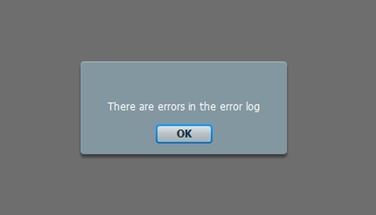
When trying to open an exported .mht Flash file with a "States of USA" Image Layout widget in the internet browser, the error below occurs.  This occurs when using an .mht file that was exported from Strategy Web Universal using Apache Tomcat and Linux.
 

ka04W000000Og3pQAC_0EM4400000026bj.jpeg


There are errors in the error log.

 
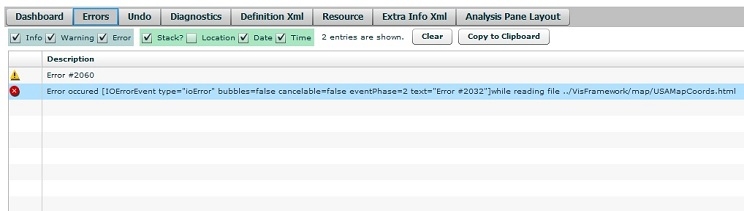
When checking the Flash debugger tool the error below is seen.


ka04W000000Og3pQAC_0EM4400000026bl.jpeg


Error #2060
 
Error occurred while reading file ../VisFramework/map/USAMapCoords.html


NOTE: To enable the Flash Debugger, refer to KB17128: How to enable the Flash Debugger in MicroStrategy Web 9.4.1.
 
STEPS TO REPRODUCE:
Using Strategy Tutorial Project:

  • Create a report with Customer State in the rows.
  • Convert the report into a document.
  • Apply the Flash Image Layout widget to the grid.
  • In the properties of the Image Layout widget, set it to show States of USA.
  • Save and run the document in Flash mode.
  • Export the document to a Flash .mht file and save the file down to the client machine. 
ka04W000000Og3pQAC_0EM4400000026bf.png
  • Run the .mht file in Internet Explorer 9.  The error should pop up.

CAUSE:
The export to MHT is performed by the Strategy Intelligence Server and not the Strategy Web server. In order to render the widget, the USAMapCoords.html file required and the Strategy Web server already has this file, therefore it works through Strategy Web, but the file doesn't exist in the Strategy Intelligence Server installation folders.
 
ACTION:

  1. In the Strategy Intelligence Server machine, navigate to the following folder: :
    
    /install/VisFramework

  2. Create a folder under this directory and name it "map".
  3. Then, in the Strategy Web server home directory, navigate to the following folder:


    VisFramework\map
    

  4. Find the USAMapCoords.html and copy the file into the folder created in step 2.
  5. Restart the Strategy Intelligence Server for the changes to take effect.
  6. Export a new .mht Flash file from Strategy Web9.3.x. 
  7. The error should not occur now.

Comment

0 comments

Details

Knowledge Article

Published:

June 29, 2017

Last Updated:

June 29, 2017