EducationSoftwareStrategy.com
StrategyCommunity

Knowledge Base

Product

Community

Knowledge Base

TopicsBrowse ArticlesDeveloper Zone

Product

Download SoftwareProduct DocumentationSecurity Hub

Education

Tutorial VideosSolution GalleryEducation courses

Community

GuidelinesGrandmastersEvents
x_social-icon_white.svglinkedin_social-icon_white.svg
Strategy logoCommunity

© Strategy Inc. All Rights Reserved.

LegalTerms of UsePrivacy Policy
  1. Home
  2. Topics

KB440052: Subtotals for calculated group element display double dashes (--) in VI Dashboard in MicroStrategy 10.7 and below


Community Admin

• Strategy


This article describes an issue where subtotals for calculated group elements display double dashes (--) in VI Dashboards in MicroStrategy 10.7 and below. A solution is provided.

SYMPTOM
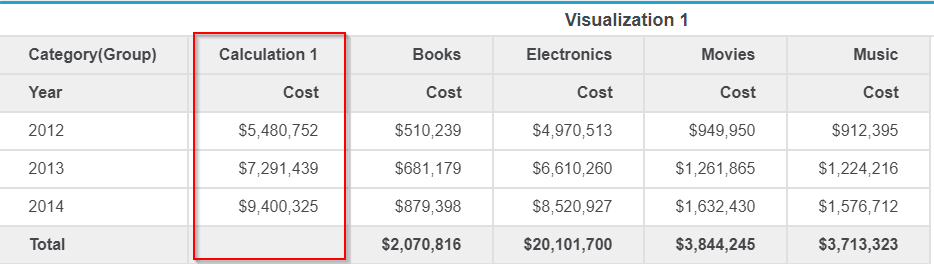
In Strategy 10.7, when executing a VI Dashboard with a calculated group element, subtotals for the calculated group element display as double dashes (--). 
ka04W000000OawGQAS_0EM44000000A44p.png

STEPS TO REPRODUCE
1. Create a VI Dashboard with an attribute in a row, and another attribute and a metric in a column
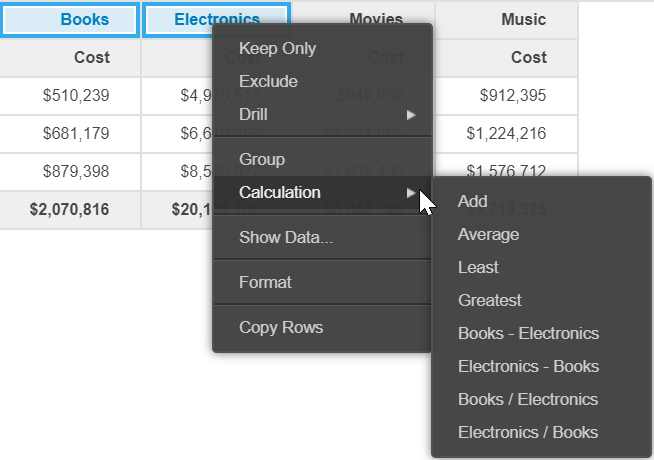
2. Create a calculation from two elements of the attribute in a column
ka04W000000OawGQAS_0EM44000000A44u.png

3. Enable "Show Totals" in the grid
4. Observe that calculated group element displays as double dashes ("--") for the calculation.
CAUSE
This is a known issue in Strategy Desktop 10.7 and below.
ACTION
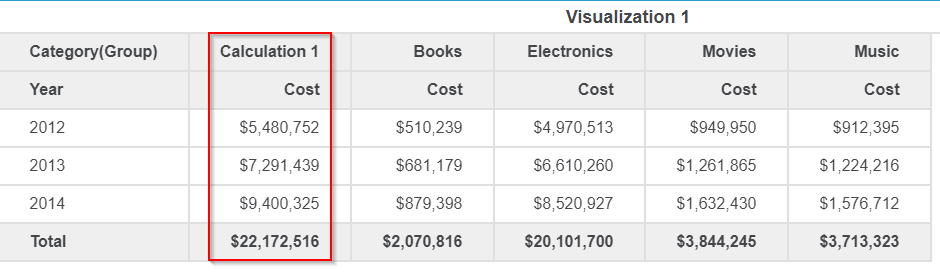
This issue has been fixed in Strategy 10.4 Hotfix 6, and 10.8 and above.
ka04W000000OawGQAS_0EM44000000A454.png

 
To apply the fix, upgrade to Strategy 10.4 Hotfix 6 or above, or Strategy 10.8 or above to take advantage of this fix.
Article Reference Number:  KB440052


Comment

0 comments

Details

Knowledge Article

Published:

March 17, 2018

Last Updated:

January 1, 2019