EducationSoftwareStrategy.com
StrategyCommunity

Knowledge Base

Product

Community

Knowledge Base

TopicsBrowse ArticlesDeveloper Zone

Product

Download SoftwareProduct DocumentationSecurity Hub

Education

Tutorial VideosSolution GalleryEducation courses

Community

GuidelinesGrandmastersEvents
x_social-icon_white.svglinkedin_social-icon_white.svg
Strategy logoCommunity

© Strategy Inc. All Rights Reserved.

LegalTerms of UsePrivacy Policy
  1. Home
  2. Topics

KB440057: How to grant permissions to users so they can execute graph reports and change the graph style without granting any other permissions in MicroStrategy Web and Developer


Sepribo Taylor-Harry

Software Engineer in Test • Strategy


This article explains how to grant permissions to users so they can execute graph reports and change the graph style in MicroStrategy Web and Developer.

Administrators may want to allow a user to execute a graph report and change the graph style without granting any other privileges in Strategy Developer and Strategy Web.
 
To grant these privileges to the end users, follow these steps:
Create a graph report. Make sure that the users are included in the Access Control List of all the objects included in the report with at least 'View' permissions. Save and close the report as a graph report, as shown below:

ka044000000kOMIAA2_0EM44000000A47A.png
ka044000000kOMIAA2_0EM44000000A47F.png

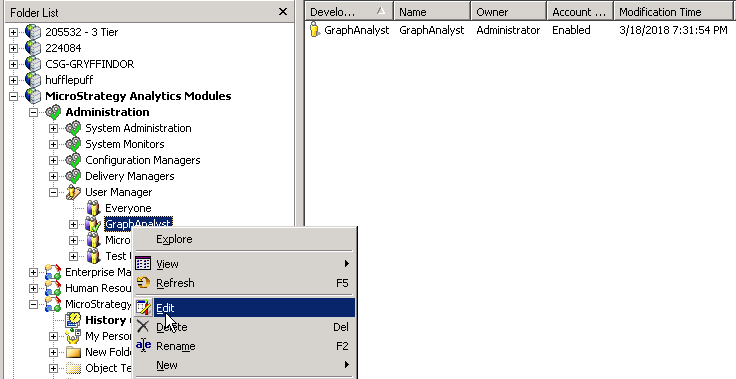
Under the Administration icon, go to the User Manager and open the User Editor for the desired Users/Groups, as shown below:
ka044000000kOMIAA2_0EM44000000A47K.png

Go to the Project Access tab. If the end users will access the graph reports through Strategy Developer, go to the Developer privileges section and grant the 'Format graph' privilege, as shown below:

ka044000000kOMIAA2_0EM44000000A47P.png

If the end users will access the Graph reports through Strategy Web, go to the Web Analyst section and grant the 'Web simple graph formatting' privilege, as shown below:

ka044000000kOMIAA2_0EM44000000A47U.png

Log in as one of the users inside the specified group and run the graph report. As shown below, the user is able to execute the report and to change the graph style, but he does not have any other privilege available:

ka044000000kOMIAA2_0EM44000000A47Z.png
ka044000000kOMIAA2_0EM44000000A47e.png


  KB440057


Comment

0 comments

Details

Knowledge Article

Published:

March 19, 2018

Last Updated:

February 1, 2019