SYMPTOMS:
In Strategy 10.x, attribute selector in a Panel Stack becomes unusable if the Panel Stack is used as Information Window in a Report Service Document. The attribute selector only becomes usable when moved outside the Information Window.
STEPS TO REPRODUCE:
1. In a document, create a grid with 2 attributes and a metric
2. Add a panel stack to the document
3. Add a grid into the panel stack with one attribute and metric, and a drop-down attribute element qualification selector
4. Right-click on the panel stack -> properties and formatting -> under general, check 'use as information window'.
5. Right-click on an attribute column from grid one (created outside of the panel stack) -> use as selector.
6. Right-click on the same attribute -> edit selector -> make sure it's targeting the panel stack to validate the information window
7. Run the document in presentation mode.
8. Click on any element used as selector in the grid. The information window should come up as shown below:
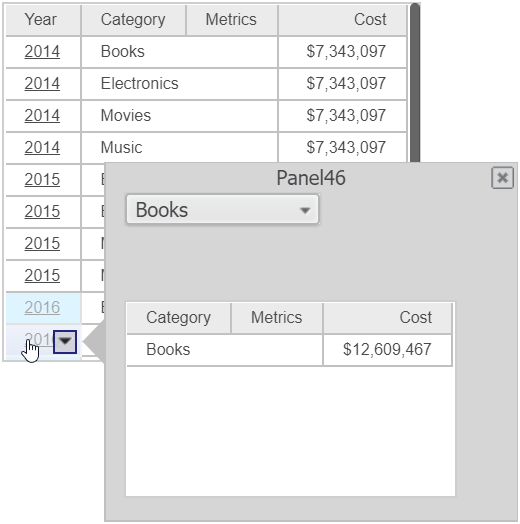
9. From the information window, try using the selector's drop-down list, it immediately disappears and nothing happens.
CAUSE:
This is a known issue in Strategy 10.x.
ACTION:
This issue has being addressed in the following Strategy versions 10.4.HF4 and 10.8. If you are not already in this version, please upgrade to that version or to the current Strategy release (10.4 HF6) to take advantage of that fix. KB440200
