EducationSoftwareStrategy.com
StrategyCommunity

Knowledge Base

Product

Community

Knowledge Base

TopicsBrowse ArticlesDeveloper Zone

Product

Download SoftwareProduct DocumentationSecurity Hub

Education

Tutorial VideosSolution GalleryEducation courses

Community

GuidelinesGrandmastersEvents
x_social-icon_white.svglinkedin_social-icon_white.svg
Strategy logoCommunity

© Strategy Inc. All Rights Reserved.

LegalTerms of UsePrivacy Policy
  1. Home
  2. Topics

KB440201: In MicroStrategy Web 10.2-10.7, trying to save a dashboard after moving a visualization from one sheet to the main sheet, results in the error: "Unable to get property of "t" of undefined or null reference"


Carlos Rodriguez

Senior Cloud Support Engineer III • MicroStrategy


In MicroStrategy Web 10.2.0 - 10.7 when users are unable to save a dashboard changes after moving a visualization from one sheet to the first sheet of the dashboard, after the changes was made the user tries to save the changes but get an error: "Unable to get property of "t" of undefined or null reference"

SYMPTOM
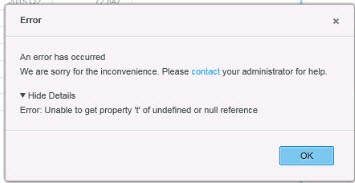
In Strategy Web 10.2 - 10.7,  when attempting to save a dashboard after moving a visualization from one sheet to an other, the following error is seen: 
ka02R000000kb1IQAQ_0EM44000000A4eE.jpeg

 
Error 
-------------------------------------------------------------------
An error has occurred 
We are sorry for the inconvenience. Please contact your administrator for help. 

Hide Detail: 
Error: Unable to get property 't' of undefined or null reference. 
STEPS TO REPRODUCE

  • In the Strategy Tutorial project, create a dashboard in Strategy Web  
  • Add the Unit Tracking by Supplier Dataset 
  • Add a grid visualization to sheet 1 (Quarter in rows and Units Received in the metric) 
  • Add a second sheet and add a pie chart visualization using Quarter and Units Received to the metric. 
  • Save the dashboard as Unit Received by Quarter 
  • Move the pie chart to Sheet 1 by clicking on the visualization drop-down options of the sheet-2 visualization. 
  • Select the 'Move to' option and choose Sheet-1 
  • A warning window pops up with the message 'Moving will clear all filters from the new visualization, Do you want to continue?' Click OK. 
  • Click on the save button to save changes to the dashboard. The following error is then encountered: 
     
ka02R000000kb1IQAQ_0EM44000000A4eE.jpeg

CAUSE
This is an identified defect in Strategy Web 10.2.0 - 10.7.0
ACTION
This issue has been addressed in Strategy Web 10.8.0 and 10.4 Hotfix 4. Upgrade to the latest 10.4 Hotfix version or the latest Strategy feature release to take advantage of this fix.
WORKAROUND
After moving the visualization from the 2nd sheet to sheet one, the empty visualization in the 2nd sheet should be deleted by clicking on the drop-down and selecting to delete (or) delete the 2nd sheet completely. 
 
  KB440201


Comment

0 comments

Details

Knowledge Article

Published:

March 27, 2018

Last Updated:

January 1, 2019