Starting with the release of Strategy ONE (March 2024), dossiers are also known as dashboards.
SYMPTOM:
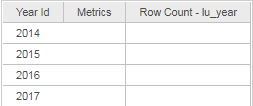
In Strategy 10.x, Report Service Document appears to show Null/Empty value for Row Count metric when using Live Connect Intelligent Cube.
STEPS TO REPRODUCE:
1) Add external dataset.
2) Choose "Database" and select the 3rd option to "Pick tables".
3) Select the LU_YEAR table from the Tutorial database instance and then select "Connect Live".
4) Create a Report Service Document using the Live Connect Cube
4) Add "Year" to the rows and "Row count" to metrics.
5) Notice that the row count for each row is Null/Empty.
CAUSE:
This is a known issue in Strategy 10.x regarding support of the Row Count metric when using Live Connect.
ACTION:
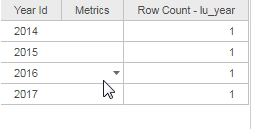
This issue has been fixed in Strategy Web 10.11.
If you are upgrading to Strategy 11.0 or above, to pick up the fix, enable project level setting "Data Engine Version" to 11 and restart I-Server. This property can only be enabled through Workstation. For more details on enabling the setting, refer to Change Data Engine Version.
If you are upgrading to Strategy 10.11: To pick up the fix, enable the Feature Flag "Defect fixes that may impact Data, SQL, MDX, CSI" within the Web Preferences -> Project Defaults. For more details on enabling Feature Flags refer to What are the Feature Flag options and what do they accomplish in MicroStrategy Web 10.8 and up. Starting Strategy 11.0, this Feature Flag is removed and replaced with project level setting called "Data Engine Version".
The Strategy Internal Reference Number for the issue discussed in this technical note is KB440213 and US100818.
