EducationSoftwareStrategy.com
StrategyCommunity

Knowledge Base

Product

Community

Knowledge Base

TopicsBrowse ArticlesDeveloper Zone

Product

Download SoftwareProduct DocumentationSecurity Hub

Education

Tutorial VideosSolution GalleryEducation courses

Community

GuidelinesGrandmastersEvents
x_social-icon_white.svglinkedin_social-icon_white.svg
Strategy logoCommunity

© Strategy Inc. All Rights Reserved.

LegalTerms of UsePrivacy Policy
  1. Home
  2. Topics

KB440234: "Collaboration Server failed to create session with MicroStrategy Library Server." when clicking the Notifications icon in MicroStrategy Library 10.10.


Shane Winslow

Cloud Support Expert I • MicroStrategy


This Knowledge Base Article describes an error seen in MicroStrategy Library 10.10 when clicking the notifications icon. The error is resolved by performing an uninstall and reinstall.

SYMPTOM:
When clicking on the Notifications icon in Strategy Library 10.10, users receive the following error as seen below.

ka02R000000kUxCQAU_0EM44000000A51S.png


Application Error
Collaboration Server failed to create session with Strategy Library Server.
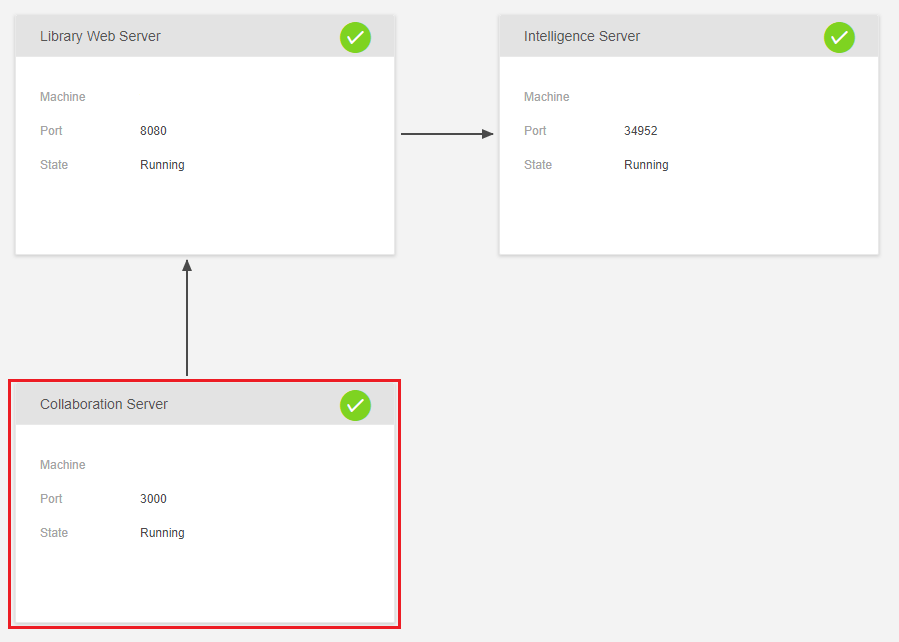
However, on the Strategy Library 10.10 admin page, the Strategy Collaboration Server is shown to be running as seen in the screenshot below.

ka02R000000kUxCQAU_0EM44000000A51N.png

STEPS TO REPRODUCE:

  1. Login to Strategy Library. 
  2. Click on the Notifications icon in the top right corner. 
ka02R000000kUxCQAU_0EM44000000A51I.png
  1. The error will appear.

CAUSE:
One potential cause for this issue is a faulty installation of the Strategy Library components where the file mongo_init.js was not created. By default, this file is located here on a Windows machine.


C:\Program Files (x86)\MicroStrategy\Collaboration Server\MongoDB\mongo_init.js 

 
ACTION:
Confirm if the mongo_init.js file was created in the location specified above. If the file is not there, uninstall and reinstall the Strategy Library components to resolve the issue.
 
 
The Strategy Internal Reference Number for this issue is: KB440234
KB440234


Comment

0 comments

Details

Knowledge Article

Published:

March 23, 2018

Last Updated:

January 1, 2019