EducationSoftwareStrategy.com
StrategyCommunity

Knowledge Base

Product

Community

Knowledge Base

TopicsBrowse ArticlesDeveloper Zone

Product

Download SoftwareProduct DocumentationSecurity Hub

Education

Tutorial VideosSolution GalleryEducation courses

Community

GuidelinesGrandmastersEvents
x_social-icon_white.svglinkedin_social-icon_white.svg
Strategy logoCommunity

© Strategy Inc. All Rights Reserved.

LegalTerms of UsePrivacy Policy
  1. Home
  2. Topics

KB44026: How to make data separated by semicolon instead of comma when delivering reports into CSV file with stylesheet "MCSR7toText-CSV" in Narrowcast Server 9.4.x-10.x?


Community Admin

• Strategy


This knowledge base article explains how to make data separated by semicolon instead of comma when delivering reports into CSV file with stylesheet "MCSR7toText-CSV" in Narrowcast Server 9.4.x-10.x.

In some business scenarios, it is required to make data separated by semicolon instead of comma when delivering reports into CSV file with stylesheet "MCSR7toText-CSV" in Narrowcast Server 9.4.x-10.x.
The following steps demonstrate how to do this in Narrowcast tutorial system:
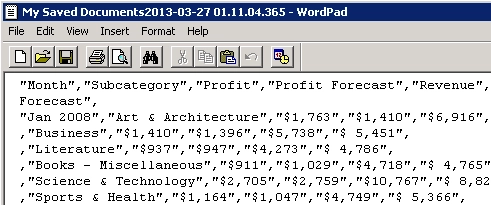
  1. Run a test service to deliver a CSV document with stylesheet "MCSR7toText-CSV" into "C:\" folder. The test CSV file data is separated by comma as shown below:
ka04W000000OeP1QAK_0EM4400000029a9.png


  • Copy "MCSR7toText-CSV" file in "C:\Program Files\Strategy\Narrowcast Server\Delivery Engine\XSL\TextDocuments" ("C:\Program Files (x86)\Strategy\Narrowcast Server\Delivery Engine\XSL\TextDocuments" for 64 bit machine) to new one "MCSR7toText-CSV-Semicolon".
  • Edit "MCSR7toText-CSV-Semicolon" and replace "<xsl:text>,</xsl:text>" with "<xsl:text>;</xsl:text>". Save and close.
  • Import "MCSR7toText-CSV-Semicolon" into Narrowcast tutorial system by following tech note below:

KB30857: How to import a file or XSL stylesheet into MicroStrategy Narrowcast Server 9.x-10.x
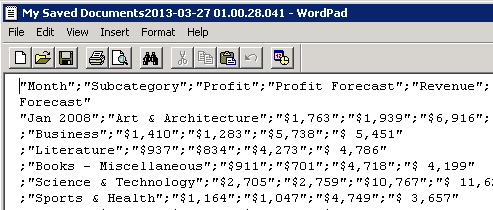
  • Modify the test service to use new stylesheet. The test CSV file data is separated by semicolon as shown below:
ka04W000000OeP1QAK_0EM4400000029aB.png

Comment

0 comments

Details

Knowledge Article

Published:

June 9, 2017

Last Updated:

June 9, 2017