EducationSoftwareStrategy.com
StrategyCommunity

Knowledge Base

Product

Community

Knowledge Base

TopicsBrowse ArticlesDeveloper Zone

Product

Download SoftwareProduct DocumentationSecurity Hub

Education

Tutorial VideosSolution GalleryEducation courses

Community

GuidelinesGrandmastersEvents
x_social-icon_white.svglinkedin_social-icon_white.svg
Strategy logoCommunity

© Strategy Inc. All Rights Reserved.

LegalTerms of UsePrivacy Policy
  1. Home
  2. Topics

KB440264: MicroStrategy queries all columns in the background and reports an error "System Error 0x80004005(2147500037): --- Unspecified error" when running a live connected VI dashboard with custom group in MicroStrategy 10.4


Xiaodan Ma

Senior Cloud Support Engineer III • MicroStrategy


MicroStrategy queries all columns in the background and reports an error "System Error 0x80004005(2147500037): --- Unspecified error" when running a live connected VI dashboard with custom group in MicroStrategy 10.4

SYMPTOM
Strategy queries all columns in the background and reports an error "System Error 0x80004005(2147500037): --- Unspecified error" when running a live connected VI dashboard with a custom group in Strategy 10.4.
STEPS TO REPRODUCE
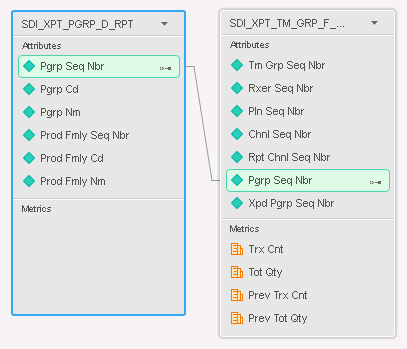
  • Enable the SQL trace log by following KB13189: How to trace the SQL generated by MicroStrategy Engine 9.x.
  • In Web, import data from a data source. For example:
ka044000000kOdLAAU_0EM44000000A6ju.png
  • Save the imported data cube as a live connection.
  • Create a Visual Insight dashboard based on the imported data cube.
  • Add an attribute "Dr City" and a metric "Trx Cnt" to the grid visualization.  
  • Right-click the "Dr City" on the grid and create a custom group.
  • Insert a filter visualization and drag the custom group "Dr City(Group)" from Dashboard Dataset section to the filter visualization, use the custom group as a selector and target the grid visualization in step 5.
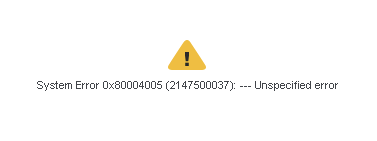
  • Uncheck "All other elements" in the filter visualization, note that the error "System Error 0x80004005(2147500037): --- Unspecified error" appears.
ka044000000kOdLAAU_0EM44000000A6kJ.png
  • Strategy queries all columns in the SQL trace log:
    
    select	a11.RXER_SEQ_NBR  RXER_SEQ_NBR,
    	    a11.PLN_SEQ_NBR  PLN_SEQ_NBR,
    	    a12.PGRP_CD  PGRP_CD,
    	    a11.TRX_CNT  WJXBFS1
    from	dbo.SDI_XPT_TM_GRP_F_RPT	a11
    	  join	dbo.SDI_XPT_PGRP_D_RPT	a12
    	  on 	(a11.PGRP_SEQ_NBR = a12.PGRP_SEQ_NBR)
    
    select	a12.TM_GRP_SEQ_NBR  TM_GRP_SEQ_NBR,
    	    a12.RXER_SEQ_NBR  RXER_SEQ_NBR,
    	    a12.PLN_SEQ_NBR  PLN_SEQ_NBR,
    	    a12.CHNL_SEQ_NBR  CHNL_SEQ_NBR,
    	    a12.RPT_CHNL_SEQ_NBR  RPT_CHNL_SEQ_NBR,
    	    a12.PGRP_SEQ_NBR  PGRP_SEQ_NBR,
    	    a13.PGRP_CD  PGRP_CD
    from	dbo.SDI_XPT_TM_GRP_F_RPT	a12
    	  join	dbo.SDI_XPT_PGRP_D_RPT	a13
    	  on 	(a12.PGRP_SEQ_NBR = a13.PGRP_SEQ_NBR)

CAUSE
This is a known issue in Strategy Web 10.4.  Currently, Strategy internal teams are working to address this issue. 
WORKAROUND
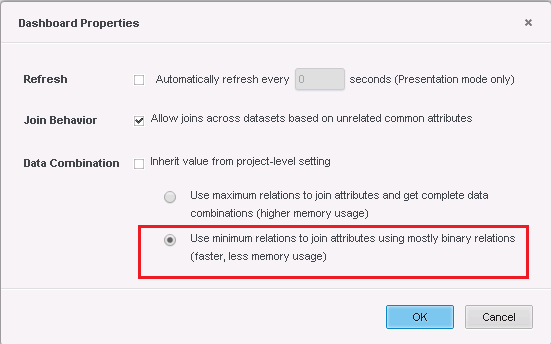
  • Go to "Home" > "Document Properties" menu, check "Use minimum relations to join attributes using mostly binary relations (faster, less memory usage)" as below:
ka044000000kOdLAAU_0EM44000000A6jV.png
  • Uncheck any element in the filter visualization, note that the data is returned.
  • Check SQL trace log, only necessary columns are queried:
    
    select	a11.RXER_SEQ_NBR  RXER_SEQ_NBR,
    	a11.PLN_SEQ_NBR  PLN_SEQ_NBR,
    	a12.PGRP_CD  PGRP_CD,
    	a11.TRX_CNT  WJXBFS1
    from	dbo.SDI_XPT_TM_GRP_F_RPT	a11
    	join	dbo.SDI_XPT_PGRP_D_RPT	a12
    	  on 	(a11.PGRP_SEQ_NBR = a12.PGRP_SEQ_NBR)

KB440264


Comment

0 comments

Details

Knowledge Article

Published:

March 30, 2018

Last Updated:

January 8, 2019