EducationSoftwareStrategy.com
StrategyCommunity

Knowledge Base

Product

Community

Knowledge Base

TopicsBrowse ArticlesDeveloper Zone

Product

Download SoftwareProduct DocumentationSecurity Hub

Education

Tutorial VideosSolution GalleryEducation courses

Community

GuidelinesGrandmastersEvents
x_social-icon_white.svglinkedin_social-icon_white.svg
Strategy logoCommunity

© Strategy Inc. All Rights Reserved.

LegalTerms of UsePrivacy Policy
  1. Home
  2. Topics

KB440273: How to certify a dossier in MicroStrategy Web 10.9 and newer


Community Admin

• Strategy


This Knowledge Base article describes how to certify a dossier in MicroStrategy Web and display in Library.

Starting with the release of Strategy ONE (March 2024), dossiers are also known as dashboards.
To certify dossiers in Strategy Web, following the below steps with a user who has administrative privileges. Users without administrative privileges will not see the option to certify.
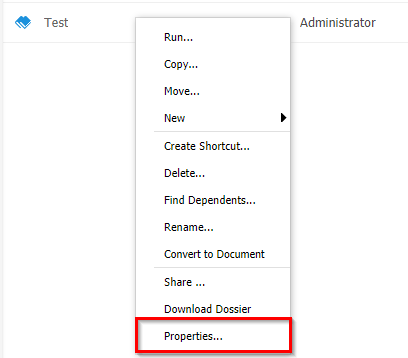
 

  • In Strategy Web, right-click on a dossier and select Properties.
ka0PW0000001JUWYA2_0EM44000000A5Lw.png


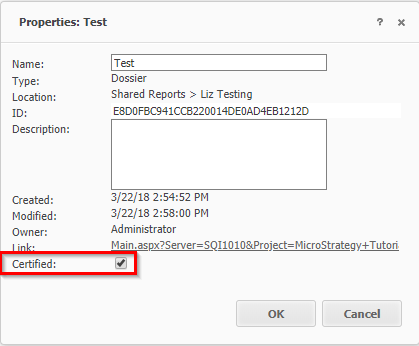
  • Check the Certified option and click Ok.
ka0PW0000001JUWYA2_0EM44000000A5M1.png


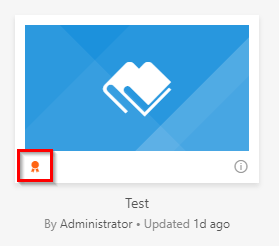
  • Navigate to Strategy Library and users will see the orange certified flag displayed for the dossier.
ka0PW0000001JUWYA2_0EM44000000A5M6.png

  KB440273


Comment

0 comments

Details

Knowledge Article

Published:

March 23, 2018

Last Updated:

March 21, 2024