EducationSoftwareStrategy.com
StrategyCommunity

Knowledge Base

Product

Community

Knowledge Base

TopicsBrowse ArticlesDeveloper Zone

Product

Download SoftwareProduct DocumentationSecurity Hub

Education

Tutorial VideosSolution GalleryEducation courses

Community

GuidelinesGrandmastersEvents
x_social-icon_white.svglinkedin_social-icon_white.svg
Strategy logoCommunity

© Strategy Inc. All Rights Reserved.

LegalTerms of UsePrivacy Policy
  1. Home
  2. Topics

KB44029: Vertical metric Header in a grid column is too long when exported to PDF from Microstrategy Developer 9.4.x-10.x


Stefan Zepeda

Salesforce Solutions Architect • Strategy


A very long vertical metric Header in a grid column is not resized automatically when exported to PDF from Microstrategy Developer 9.4.x-10.x.

SYMPTOM
A very long vertical metric Header in a grid column is not resized automatically when exported to PDF from Strategy Developer 9.4.x-10.x.

ka02R000000kcRVQAY_0EM440000002ChZ.jpeg

 
STEPS TO REPRODUCE

  • Create a metric with a long name
  • Create a report with an attribute and this metric
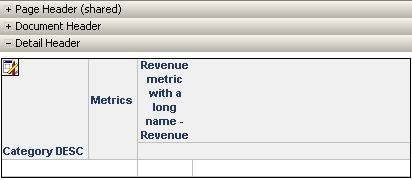
  • Create a document and add the report as a grid in the detail header
ka02R000000kcRVQAY_0EM440000002Chd.jpeg
  • Modify the formatting options of the cells to enable word wrap and 90 degrees rotation to display the metric names vertically
ka02R000000kcRVQAY_0EM440000002Che.jpeg
  • Export to PDF.

The header displays on one line. The word wrap or handle display command does not allow to resize the height of the column to display vertical text on more than on line and occupy less space.
 
CAUSE
A vertical metric header cannot be resized .
Word wrap and columns handles allow to resize the column header size and display the header on several lines when it is horizontal but not when the text is vertical.
ACTION
Please post to the Ideas Exchange if you would like this functionality to be enhanced.


Comment

0 comments

Details

Knowledge Article

Published:

April 21, 2017

Last Updated:

April 21, 2017