EducationSoftwareStrategy.com
StrategyCommunity

Knowledge Base

Product

Community

Knowledge Base

TopicsBrowse ArticlesDeveloper Zone

Product

Download SoftwareProduct DocumentationSecurity Hub

Education

Tutorial VideosSolution GalleryEducation courses

Community

GuidelinesGrandmastersEvents
x_social-icon_white.svglinkedin_social-icon_white.svg
Strategy logoCommunity

© Strategy Inc. All Rights Reserved.

LegalTerms of UsePrivacy Policy
  1. Home
  2. Topics

KB440331: How to generate or obtain Web Service WSDL file from Salesforce for MicroStrategy XQuery Reporting 10.x?


Tianfeng (Jimmy) Jiang

Quality Engineer, Principal • MicroStrategy


This document shows how to generate or obtain Web Service WSDL file from Salesforce for MicroStrategy XQuery Reporting 10.x

The following Salesforce document shows how to generate or obtain the Web Service WSDL file from Salesforce to connect to Salesforce with API:
https://developer.salesforce.com/docs/atlas.en-us.api.meta/api/sforce_api_quickstart_steps_generate_wsdl.htm
The following steps are sample steps:
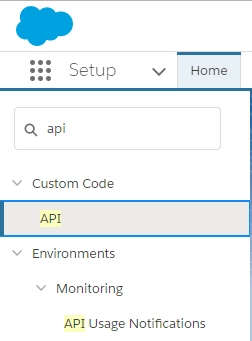
  • Log in to Developer Edition Salesforce account. 
  • From Setup, enter API in the Quick Find box, then select API to display the WSDL download page.
ka044000000kOvcAAE_0EM44000000A5eZ.png
  • Download the appropriate WSDL
ka044000000kOvcAAE_0EM44000000A5ee.png


KB440331


Comment

0 comments

Details

Knowledge Article

Published:

March 30, 2018

Last Updated:

December 31, 2018