INTRODUCTION
HubSpot is an inbound marketing and sales platform that helps companies attract visitors and convert leads. Starting in Strategy 10.11, the HubSpot JDBC connector is shipped out-of-the-box and can be used to connect to HubSpot as data source when doing data import in Strategy Web and Workstation. Connection to HubSport is supported as an In-memory data import connection. Live Connect data import is not supported with connections against HubSpot.
CONFIGURATION STEPS
1. In Strategy Web select the option to Add External Data
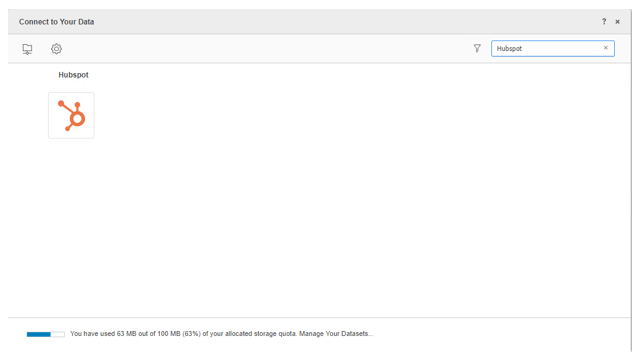
2. Select the Hubspot data source
3. Select the option to Select Tables, Type a Query, or Build Query
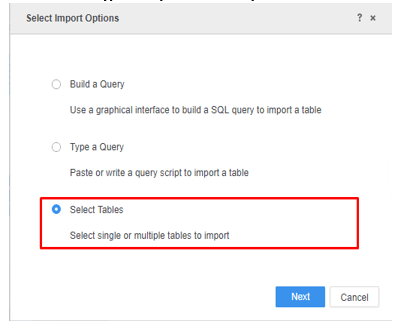
Note: It is recommended to use Select Tables to reduce joins on the driver side for performance reasons.
4. In the Data Source interface, select DSN-less Data Source and choose ‘HubSpot’ for both Database and Version.
Access Token: Fill in the required Host Name, Access Token, User, Password and Data Source Name.
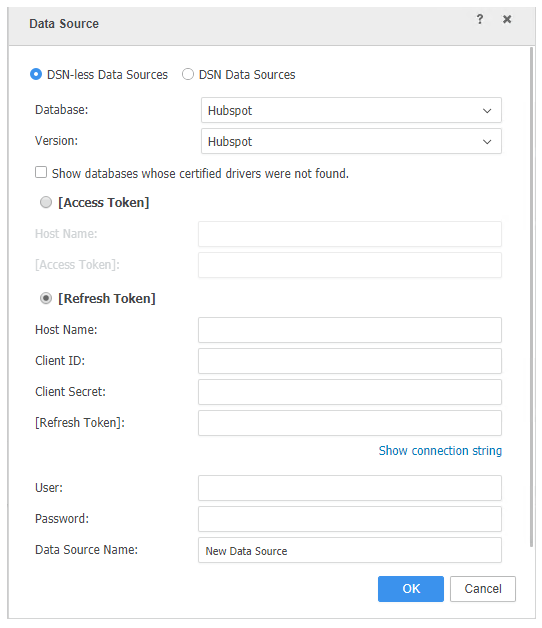
Refresh Token: Fill in the required Host Name, Client ID, Client Secret, Refresh Token, User, Password, Data Source Name.
NOTE: It will be necessary to input a dummy user and password in order to save the new data source. However the user and password entered here will not be used in the connection to the data source.
5. Once the new connection has been created it can be selected as a data source when doing data import.
KB440334
