Description
Within Strategy Workstation 10.x, some of our users have been experiencing trouble configuring HTTPS. When using Self-Signed Certificates, many users will receive an error message that reads, "An error occurred while sending the request. The underlying connection was closed: Could not establish trust relationship for the SSL/TLS secure channel." When connecting to Strategy Library 10.x using Strategy Workstation 10.x, and then attempting to connect to an environment using an HTTPS connection, the user will view the following image located below:
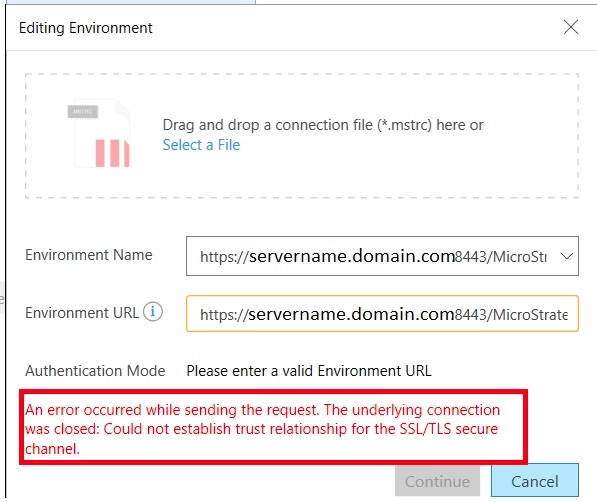
Why is this happening?
This is working as designed in Strategy Web. Strategy Workstation requires that a valid, trusted SSL Certificate is installed on the local machine as well as configured in the cacert.pem file by copying over the contents of the certificate into the .pem file, default location “C:\Program Files\MicroStrategy\Workstation\cacert.pem”.
Solution
Third party software installation WARNING
The third-party product(s) discussed in this technical note is manufactured by vendors independent of Strategy. Strategy makes no warranty, express, implied or otherwise, regarding this product, including its performance or reliability.
Have other questions? Feel free to start a discussion or reach out to your Support liaison to open a case!
Want to upgrade to Strategy 2019? Visit the Strategy website!
