EducationSoftwareStrategy.com
StrategyCommunity

Knowledge Base

Product

Community

Knowledge Base

TopicsBrowse ArticlesDeveloper Zone

Product

Download SoftwareProduct DocumentationSecurity Hub

Education

Tutorial VideosSolution GalleryEducation courses

Community

GuidelinesGrandmastersEvents
x_social-icon_white.svglinkedin_social-icon_white.svg
Strategy logoCommunity

© Strategy Inc. All Rights Reserved.

LegalTerms of UsePrivacy Policy
  1. Home
  2. Topics

KB44036: How to check the time Intelligence Server used to generate SQL in MicroStrategy Enterprise Manager 9.4.x - 10.x?


Community Admin

• Strategy


How to check the time Intelligence Server used to generate SQL in MicroStrategy Enterprise Manager 9.4.x - 10.x?

In order to track every execution steps including the SQL generation when running a report, go to Project Configuration>Statistics>General, and make sure Report job steps has been checked under Advanced Statistics Collections Options as below:
 

ka04W000000OggXQAS_0EM4400000029aF.png

 
After the data load, go to Strategy Enterprise Manager Project, and create a report with attribute "Report" and metric "RP SQL Engine Duration (hh:mm:ss)" under Public Objects\Metrics\Report Processing Analysis, which will show the time used to generate SQL in the format of timestamp as below:
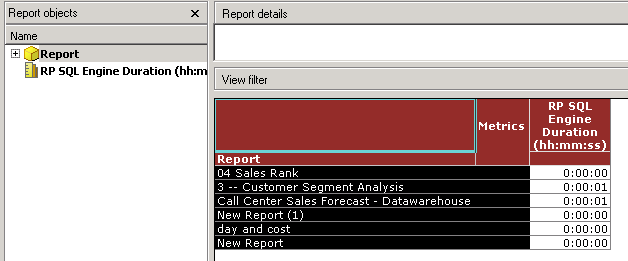
 

ka04W000000OggXQAS_0EM4400000029aI.png

 
The metric "RP SQL Engine Duration (hh:mm:ss)" calculate the time taken by a report job to generate SQL. However, for simple reports,  the result of the metric may be too small to see the difference. In order to show the metric in the format of millisecond, modify the metric following below steps:
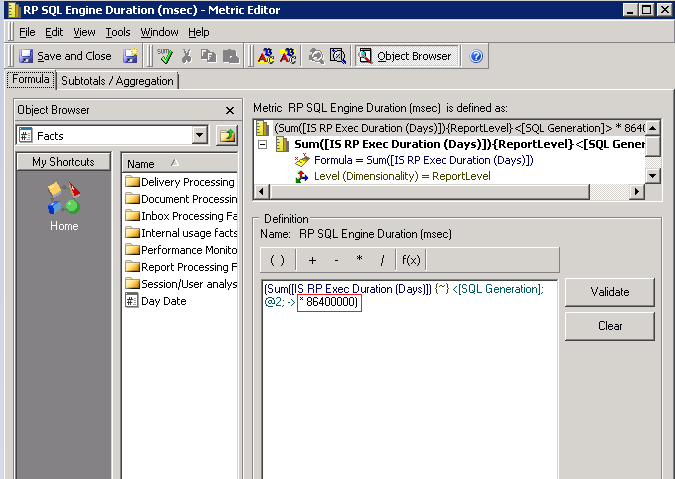
 

  1. Edit the metric "RP SQL Engine Duration (hh:mm:ss)" to multiply 86400000 as below:
ka04W000000OggXQAS_0EM4400000029a6.png


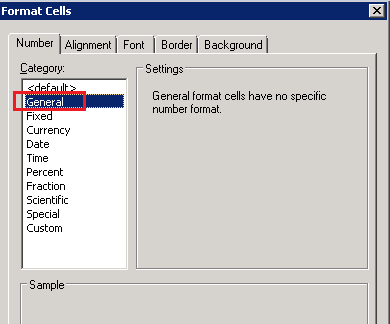
  • Go to Tools>Formatting>values, and set the Number as "General" shown below:
ka04W000000OggXQAS_0EM4400000029aH.png


  • Save the modified metric as "RP SQL Engine Duration (msec)" and add it to the report with attribute "Report". The time spent to generate SQL in millisecond format is shown below:
ka04W000000OggXQAS_0EM4400000029aG.png


Comment

0 comments

Details

Knowledge Article

Published:

June 13, 2017

Last Updated:

June 13, 2017