EducationSoftwareStrategy.com
StrategyCommunity

Knowledge Base

Product

Community

Knowledge Base

TopicsBrowse ArticlesDeveloper Zone

Product

Download SoftwareProduct DocumentationSecurity Hub

Education

Tutorial VideosSolution GalleryEducation courses

Community

GuidelinesGrandmastersEvents
x_social-icon_white.svglinkedin_social-icon_white.svg
Strategy logoCommunity

© Strategy Inc. All Rights Reserved.

LegalTerms of UsePrivacy Policy
  1. Home
  2. Topics

Overview of MicroStrategy Connection File


Ellen (Aiqun) Wang

Product Owner, Principal • MicroStrategy


This article provides an overview of the MicroStrategy connection file (.mstrc). You can create a connection to an environment using a MicroStrategy connection file (.mstrc). This connection file simplifies the task of setting up new environments as you can provide this file to other users in the organization who can then use it to connect to that environment easily. The .mstrc text file contains the information needed to connect Workstation to a MicroStrategy environment.

Starting with the release of Strategy ONE (March 2024), dossiers are also known as dashboards.
New Features & Functionality
Overview of Strategy Connection File
You can create a connection to an environment using a Strategy connection file (.mstrc). This connection file simplifies the task of setting up new environments as you can provide this file to other users in the organization who can then use it to connect to that environment easily. The .mstrc text file contains the information needed to connect Workstation to a Strategy environment.
What does the .mstrc include?
 

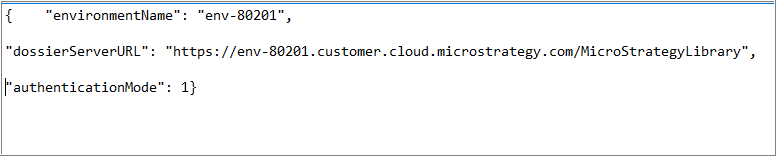
  • Environment Name—a unique name for your environment
  • dossierServerURL—refers to URL of the Library Web Server associated with your environment
  • Authentication Mode—way to authenticate when connecting to an environment
    • Possible options are Standard or Identity products

The following image shows the contents of a .mstrc connection file:
ka0PW0000001JRkYAM_0EM44000000A68A.png

Want to get more information?
To learn how to generate a .mstrc file, refer to:
How to Generate a Strategy Connection File to Connect Workstation to a Strategy Environment
KB39282 : Creating a Connection File in Workstation
Also, the Education team invites you to the Administration for Enterprise Analytics (10.311) course to learn more about administering the Strategy platform using Workstation.
 
Have other questions? Feel free to start a discussion or reach out to your Support liaison to open a case!
 
Want to upgrade to Strategy 2019? Visit the Strategy website!


Comment

0 comments

Details

Knowledge Article

Published:

March 28, 2018

Last Updated:

March 21, 2024