EducationSoftwareStrategy.com
StrategyCommunity

Knowledge Base

Product

Community

Knowledge Base

TopicsBrowse ArticlesDeveloper Zone

Product

Download SoftwareProduct DocumentationSecurity Hub

Education

Tutorial VideosSolution GalleryEducation courses

Community

GuidelinesGrandmastersEvents
x_social-icon_white.svglinkedin_social-icon_white.svg
Strategy logoCommunity

© Strategy Inc. All Rights Reserved.

LegalTerms of UsePrivacy Policy
  1. Home
  2. Topics

KB4404: Columns are shifted when exporting a Report Services document with text boxes overlapped on grid to Excel format in MicroStrategy Web 9.x


Community Admin

• Strategy


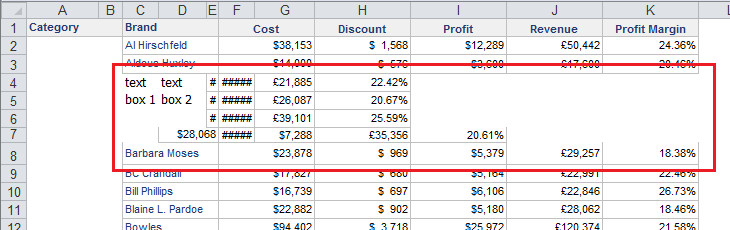
Columns are shifted when exporting a Report Services document with text boxes overlapped on grid to Excel format in MicroStrategy Web 9.x

SYMPTOM
Columns are shifted when exporting a Report Services document with text boxes overlapped on grid to Excel format in Strategy Web 9.x, as shown below:
ka04W000000OaWbQAK_0EM4400000027JR.png

 
STEPS TO REPRODUCE
Follow the steps below to reproduce the issue with Strategy Tutorial project:
  1. Create a new report in Strategy Web with attribute Category, Brand in the row and metrics Cost, Discount, Profit, Revenue, Profit Margin in the column.
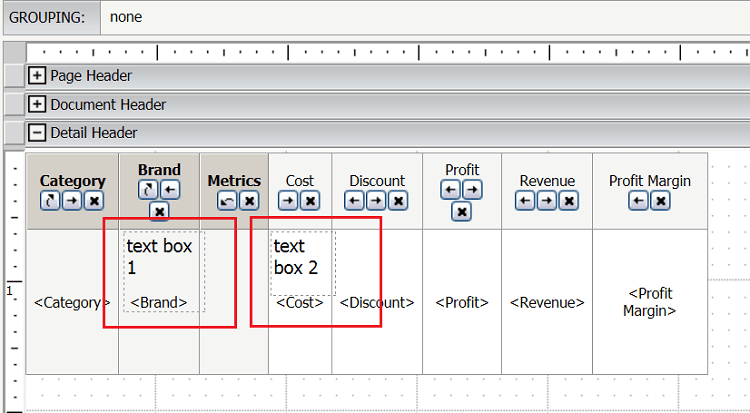
  2. Create a new Report Services document using report created at step 1 as a dataset. Drop the dataset into document Detail Header.
  3. Add two text boxs overlapped on grid in Detail Header, as shown below:
ka04W000000OaWbQAK_0EM4400000027JY.png

 
CAUSE
This is a known issue in Strategy Web 9.x.
ACTION
Strategy will continue to investigate and post updates as soon as they are available.
 
WORKAROUND
Following the steps below to export document using Office 2007:
  • Go to Preferences>User Preferences>Export Reports and select "Excel 2003/xp" as Excel version under Export options section.
  • Export the document created at steps 3 to Excel format using Office 2003/2007/2010 and note that the columns are shifted.
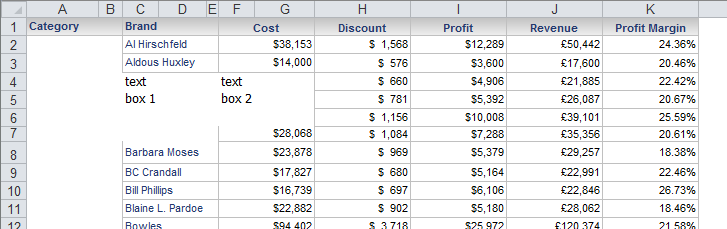
    1. Go to Preferences>User Preferences>Export Reports and select "Excel 2007 or newer versions" as Excel version under Export options section.
    2. Export the document create above to Excel format using Office 2007/2010 and note that columns are not shifted, as shown below:
ka04W000000OaWbQAK_0EM4400000027JW.png

Article Reference Number: 
KB4404


Comment

0 comments

Details

Knowledge Article

Published:

June 14, 2017

Last Updated:

December 31, 2018