EducationSoftwareStrategy.com
StrategyCommunity

Knowledge Base

Product

Community

Knowledge Base

TopicsBrowse ArticlesDeveloper Zone

Product

Download SoftwareProduct DocumentationSecurity Hub

Education

Tutorial VideosSolution GalleryEducation courses

Community

GuidelinesGrandmastersEvents
x_social-icon_white.svglinkedin_social-icon_white.svg
Strategy logoCommunity

© Strategy Inc. All Rights Reserved.

LegalTerms of UsePrivacy Policy
  1. Home
  2. Topics

KB440403: How to do a complete uninstall of MicroStrategy Desktop 10.10 on a MAC


Community Admin

• Strategy


This Knowledge Base article explains how to do a complete uninstall of MicroStrategy Desktop from a MAC machine.

Starting with the release of Strategy ONE (March 2024), dossiers are also known as dashboards.
To completely uninstall Strategy Desktop 10.10 from a MAC machine after moving Desktop to “Trash” and clearing the trashcan, there are additional files that need to be removed from the machine. Follow the below steps to remove these files from the MAC machine.
 

  • Navigate to the Macintosh HD (MAC Hardrive) and then go into the Users folder. Select the user account being used.
ka0PW0000001JUSYA2_0EM44000000A6GJ.png


ka0PW0000001JUSYA2_0EM44000000A6GO.png


  • Right-click, and select “Show View Options”
ka0PW0000001JUSYA2_0EM44000000A6GT.png


  • Select option to “Show Library Folder”
ka0PW0000001JUSYA2_0EM44000000A6GY.png


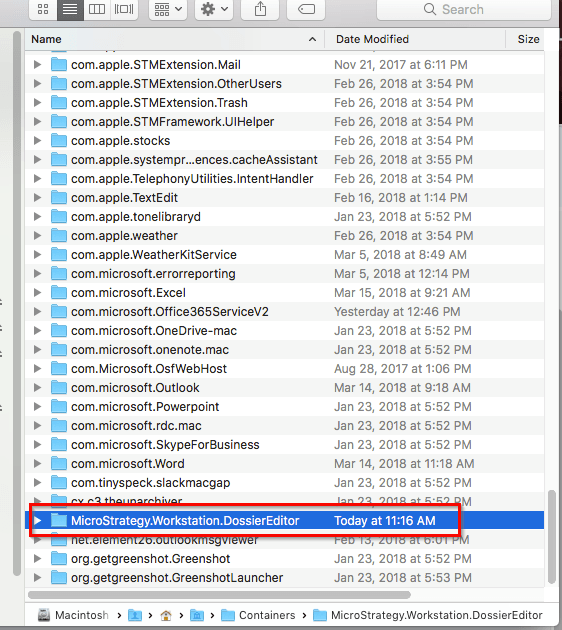
  • Navigate to /Users/xxx/Library/Containers/Strategy.Workstation.DossierEditor


  • Move the folder Strategy.Workstation.DossierEditor to Trash.
ka0PW0000001JUSYA2_0EM44000000A6Gd.png

 
  KB440403


Comment

0 comments

Details

Knowledge Article

Published:

March 28, 2018

Last Updated:

March 21, 2024