EducationSoftwareStrategy.com
StrategyCommunity

Knowledge Base

Product

Community

Knowledge Base

TopicsBrowse ArticlesDeveloper Zone

Product

Download SoftwareProduct DocumentationSecurity Hub

Education

Tutorial VideosSolution GalleryEducation courses

Community

GuidelinesGrandmastersEvents
x_social-icon_white.svglinkedin_social-icon_white.svg
Strategy logoCommunity

© Strategy Inc. All Rights Reserved.

LegalTerms of UsePrivacy Policy
  1. Home
  2. Topics

KB440414: In AWS instance, Arial font changes after exporting to PDF in MicroStrategy Web 10.7.


Community Admin

• Strategy


In an AWS instance, Arial font in a report exported to PDF is changed to a different font. It is expected that the font displayed after exporting to PDF is the same font shown in the report.
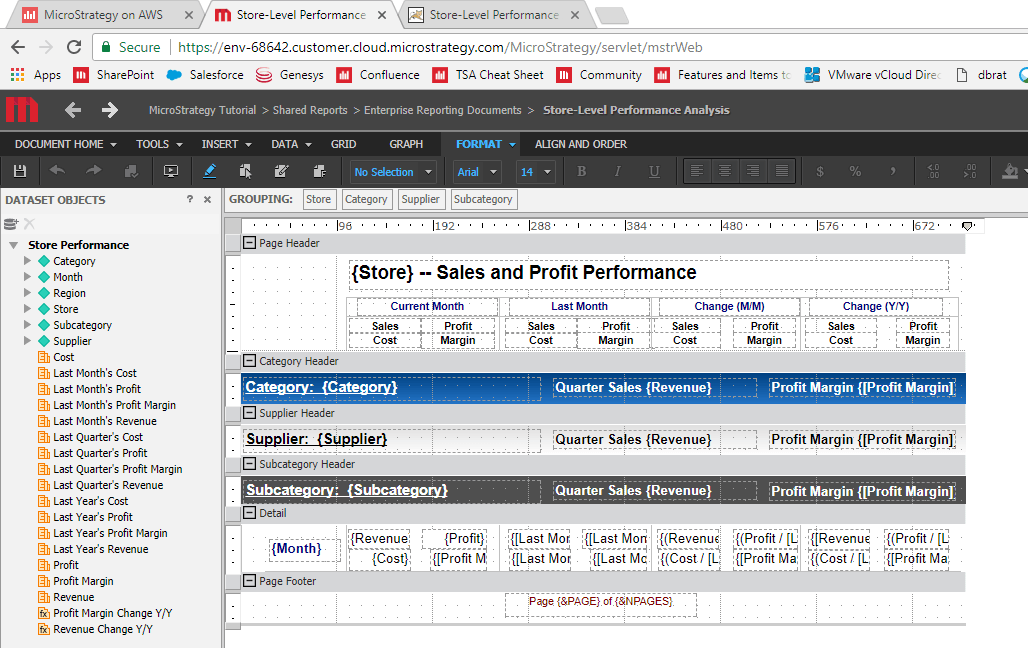
In an AWS instance, Arial font in a report exported to PDF is changed to a different font. It is expected that the font displayed after exporting to PDF is the same font shown in the report.

ka04W000000ObsjQAC_0EM44000000A6xD.png

STEPS TO REPRODUCE

  1. Spin fresh instance of AWS Provisioning Cloud Strategy machine
  2. Run any Tutorial report in Web
  3. Export report to PDF

CAUSE
The exported PDF displays a different font because the desired font has not been installed on the AWS server machine.
ACTION
The AWS team can install the desired font if the customer purchases a license for the font. KB440414


Comment

0 comments

Details

Knowledge Article

Published:

March 30, 2018

Last Updated:

November 13, 2018