EducationSoftwareStrategy.com
StrategyCommunity

Knowledge Base

Product

Community

Knowledge Base

TopicsBrowse ArticlesDeveloper Zone

Product

Download SoftwareProduct DocumentationSecurity Hub

Education

Tutorial VideosSolution GalleryEducation courses

Community

GuidelinesGrandmastersEvents
x_social-icon_white.svglinkedin_social-icon_white.svg
Strategy logoCommunity

© Strategy Inc. All Rights Reserved.

LegalTerms of UsePrivacy Policy
  1. Home
  2. Topics

KB440457: 82. Inactive/unused User report shows NEVER USED users in the EM_USER_NAME field of the results when running against a MySQL warehouse


Community Admin

• Strategy


The following knowledge base article provides details on how to fix the issue where the user name shows incorrectly in the 82. Inactive/unused User report when the Enterprise Manager Warehouse is on a MySQL database

SYMPTOM
Upon execution of the out of the box Enterprise Manager report, "82. Unused/Inactive Users" report, users see that the results show "NEVER USED" in place of actual username. This issue is seen only for a case where the Enterprise Manager Warehouse resides on a MySQL database.
See screenshot below.

ka04W000000Ob8vQAC_0EM44000000A5Lm.png

 
CAUSE
The issue is caused due to the default VLDB settings selected for MySQL.
 
ACTION
Follow the steps below to change the necessary VLDB properties.

  • Edit the "82. User inactive/unused report" and under the Data tab select "VLDB Properties". 
ka04W000000Ob8vQAC_0EM44000000A6HW.png
  • Make the first change by navigating to the "Joins" folder, select the "Preserve all final pass result elements" setting and make the necessary changes. See screenshot below: 

ka04W000000Ob8vQAC_0EM44000000A6Hg.png
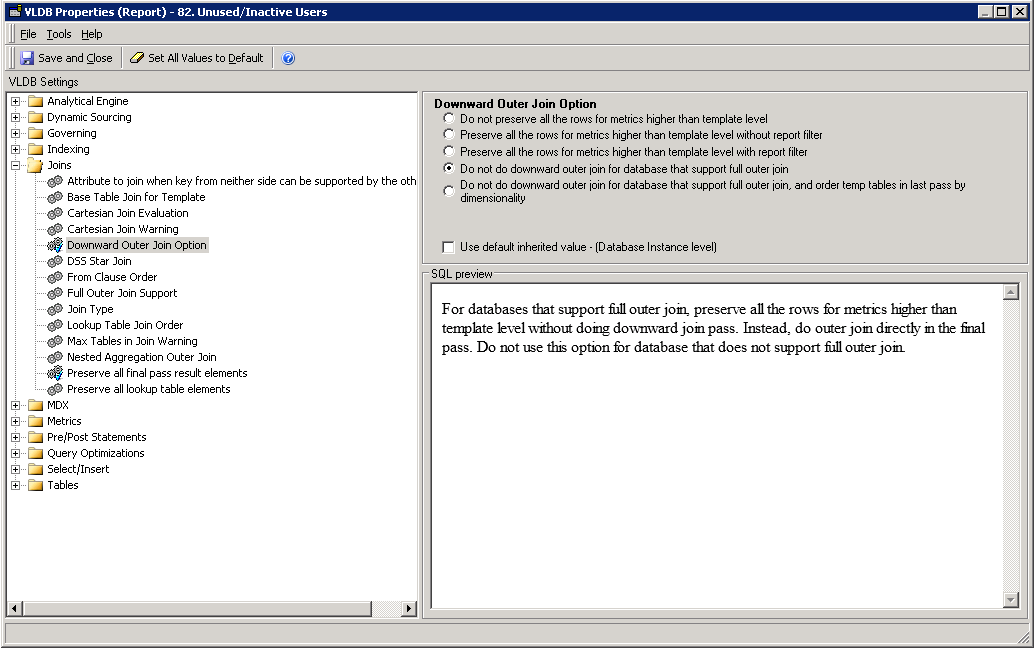
  • To make the next change navigate to the same "Joins" folder, select the "Downward Outer Join Option" setting and make the necessary changes. See screenshot below:   
     
ka04W000000Ob8vQAC_0EM44000000A6I5.png
  • Make the final change by navigating to the same "Joins" folder, select the "Full Outer Join Support" setting, and make the necessary changes. See screenshot below:   
ka04W000000Ob8vQAC_0EM44000000A6IF.png

Making these three changes to the VLDB Setting will produce the desired results for the "82. Unused/Inactive Users" report.
  KB440457


Comment

0 comments

Details

Knowledge Article

Published:

March 30, 2018

Last Updated:

December 31, 2018