SYMPTOM
Some user in Web may find that sorting functionality does not work as expected when when subtotals are enabled or when attribute elements are in the columns
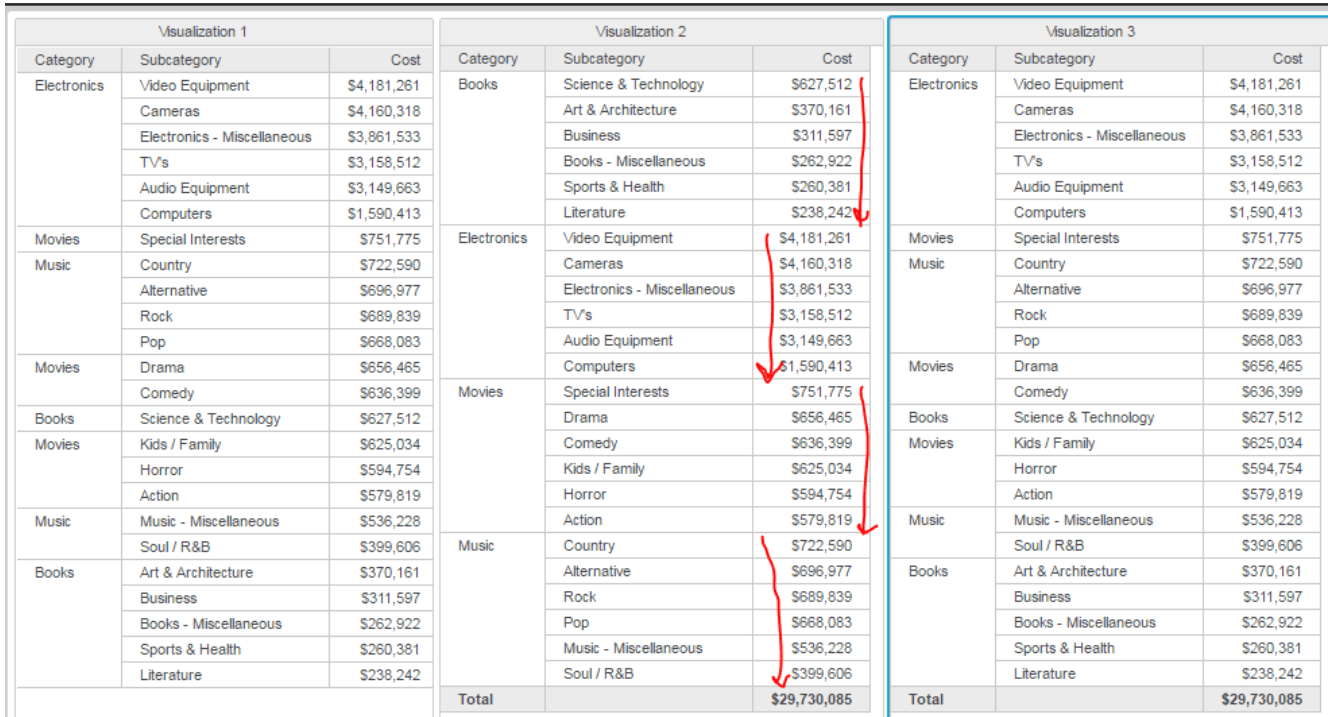
STEPS TO REPRODUCE
In Strategy Tutorial:
1. create a sample dashboard as category+subcategory+cost
2. duplicate several grid to compare.
3. Without total enabled. Try ascending & Descending for "Cost". Note that it works fine. (V1 in screenshot)
4. Enable Total for Category. Then Sort Descending for "Cost". Note, Cost is only sort in Category's group. (See V2 in screenshot) --> Expected: Sort should not have break by, because Category is the highest level attribute
5. Enable Total for Category. Open advanced sorting window, Sort Descending for "Cost". Note, Cost is sorted for all rows. (See V3 in screenshot) --> For now that's fine (we will worry about Advanced Sorting later).
6. In step. 4, if move total to top or from top to bottom, the sorting will back to correct order. --> Not expected, but we will spawn a new for issue for this.
ACTION
This issue was reviewed by our Technology team for feasibility and will not be scoped for a code fix in any upcoming Strategy release.
WORKAROUND
option 1: Move total to bottom/top. will make metrics re-sort with correct order.
option 2: Use advanced sorting.
Issue exist only in Web and in case of Total is enabled for attributes. Desktop works fine. KB440476
