EducationSoftwareStrategy.com
StrategyCommunity

Knowledge Base

Product

Community

Knowledge Base

TopicsBrowse ArticlesDeveloper Zone

Product

Download SoftwareProduct DocumentationSecurity Hub

Education

Tutorial VideosSolution GalleryEducation courses

Community

GuidelinesGrandmastersEvents
x_social-icon_white.svglinkedin_social-icon_white.svg
Strategy logoCommunity

© Strategy Inc. All Rights Reserved.

LegalTerms of UsePrivacy Policy
  1. Home
  2. Topics

KB440505: How to create a derived metric using Lag function (or any other function) that calculates on the base dataset rather than only view filtered dataset.


Community Admin

• Strategy


This Knowledge Base article describes how to create a derived metric that can use the whole dataset of the report, rather than the default functionality of using the grid dataset using the Lag function as an example.

This Knowledge Base article describes how to create a derived metric that can use the whole dataset of the report, rather than the default functionality of using the grid dataset using the Lag function as an example.
ACTION:
See below for steps to create a derived metric that can calculate lag on the whole dataset of the report. In order to do this you will need to:
 
1. Create Sum of Revenue derived metric and 2) Create a Lag of Sum of Revenue derived metric.
 
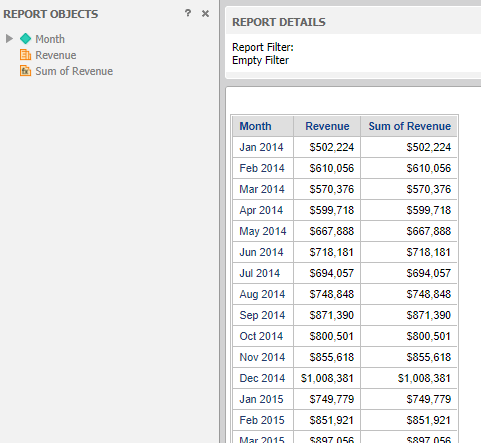
Sample report to be used –
 

ka0PW00000012ivYAA_0EM44000000A6xw.png

 
2. Create a Sum of Revenue derived metric that looks like this by right clicking the Revenue Metric from the Report objects folder and select Insert Metric… and create the metric as described below: 
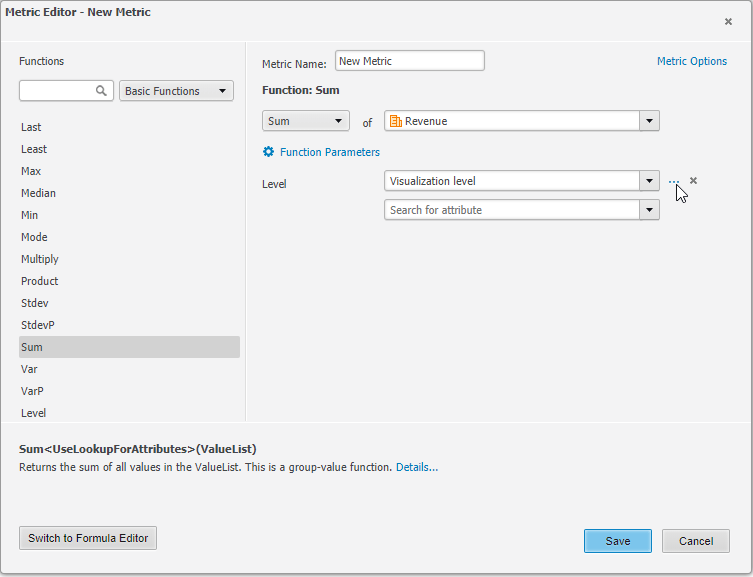
  • Click on ‘Switch to Formula Editor’ and go to Level section and click on the 3 dots next to the First level.
ka0PW00000012ivYAA_0EM44000000A6y6.png
  • For Relationship with report filter select ‘Ignore – Omit filtering criteria based on selected level and its related attributes’ 
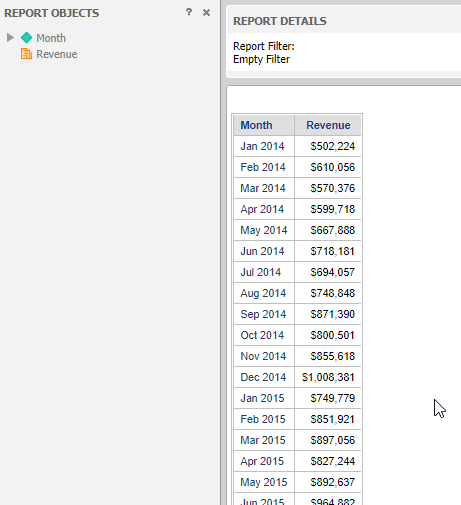
  • Report looks like this:
ka0PW00000012ivYAA_0EM44000000A6yG.png


3. Create a Lag of Sum of Revenue with these settings:
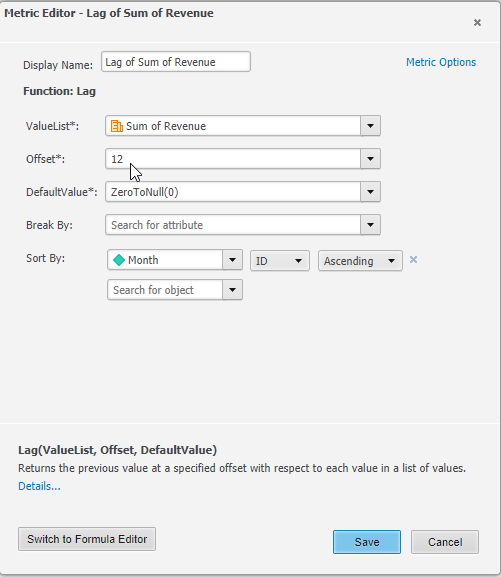
  • ValueList: Revenu
  • Offset: 12 (however many rows you want the offset to be)
  • DefaultValue: ZeroToNull(0)
  • Sort By: Month, ID, Ascending
ka0PW00000012ivYAA_0EM44000000A6ya.png
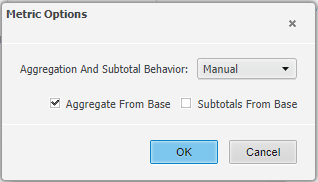
  • Metric Options: Aggregation and Subtotal Behavior to Manual and to Aggregate From Base.
ka0PW00000012ivYAA_0EM44000000A6yf.png


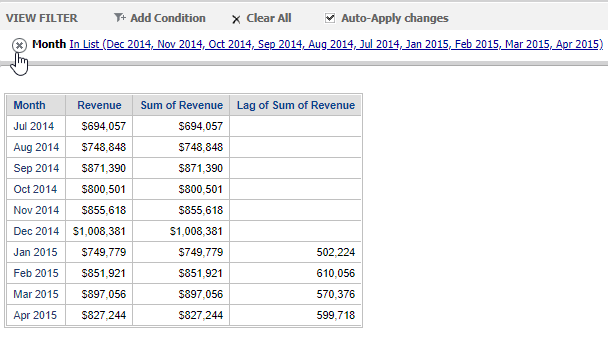
4. Derived metric Lag of Sum of Revenue uses the dataset Jan 2014-June 2016 but the view filter is only July 2014-Apr 2015 and behaves correctly. The calculation for the lag function started at Jan 2014 but only values from July 2014 are seen. 
ka0PW00000012ivYAA_0EM44000000A6yk.png

Comment

0 comments

Details

Knowledge Article

Published:

March 30, 2018

Last Updated:

March 4, 2024