Starting with the release of Strategy ONE (March 2024), dossiers are also known as dashboards.
DISCUSSION
Starting in Strategy 10.11 it is possible to configure dossiers to load chapters on demand instead of having all chapters of a dossier evaluated when the dossier is opened initially. Prior to Strategy 10.11 the workflow for dossier execution was as follows:
1. Execute the base datasets of the dossier
2. Evaluate all of the chapters of the dossier
3. Send the current chapter data to the client for display
This workflow resulted in faster performance when switching between chapters of a dossier, but it slowed the initial execution of the dossier because every chapter is evaluated when the dossier is first opened. In Strategy 10.11 it is now possible to load chapters on demand so that only the first chapter of a dossier is evaluated when the dossier is initially opened. When a user navigates between chapters of a dossier the chapters will be loaded on the fly.
Loading chapters on demand will be most beneficial in cases where a dossier has many chapters but a user may only need to see a few chapters in a session.
CONFIGURATION STEPS
Follow these steps to configure a dossier to load chapters on demand
1. In Strategy Web edit the dossier and browse to File->Dossier Properties
2. Check the box for "Load chapters on demand."
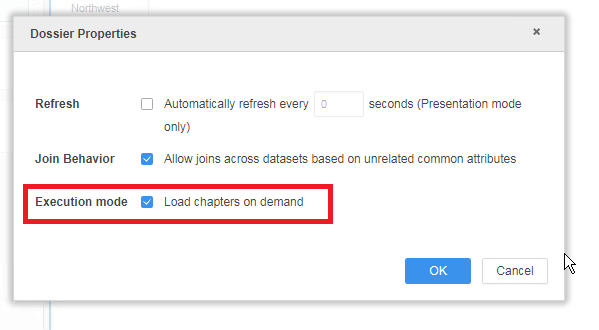
3. Click OK and then save the dossier.
KB440556
