Starting with the release of Strategy ONE (March 2024), dossiers are also known as dashboards.
KB440586
Starting 10.9, Strategy introduced the next generation of dashboards called 'Dossiers'. This new paradigm of data consumption and analysis featured a clean Library page to access objects across projects, super efficient search capabilities, simple and intuitive navigation paradigms, modern and responsive consumption workflows, and a host of powerful collaboration and sharing capabilities.
One of the often requested new workflows introduced with this new paradigm is 'personalized shortcuts or views', if you will, of dossiers for each end user. This enables the end user to save the last state of analysis for their dossiers and return back to it the next time they launch it. It allows end users to continue working on their analysis without a break in their chains of thought. It also allows them to start work on a particular device or interface, and seamlessly pick up on another without missing a beat. The dossier reconciles its state with the server in real time, keeping it up to date and consistent on all consumption interfaces, be it web, iOS or Android interfaces.
Starting 10.11, a key difference this new workflow brings about in the backend, is the generation of caches for these personalized shortcuts or views. Prior to this change, each dossier had a single base cache which was accessed by all users at all times, that limited them to a single starting point each time they launched their dossier. With the latest addition, each user will create a copy of his or her own caches, thus enabling them to leverage all the performance benefits of caching with their own custom personal views! These caches will be at the page level and the user is likely to see a Definition cache and a Data Cache per page for their dossiers.
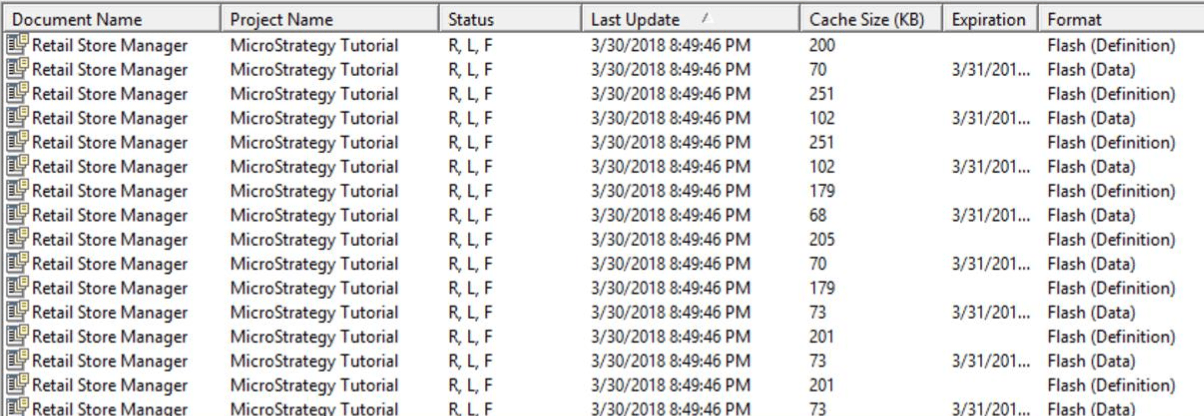
The caches will be turned ON by default, so no additional action is required on the part of the end user for this. It is recommended to keep these caches for optimal performance.
In case the admin has a concern regarding the number and size of caches being generated in the system, the caches can also be governed via settings in WorkStation. The admin can simply access the Application (Project) via Workstation and choose to do the following -
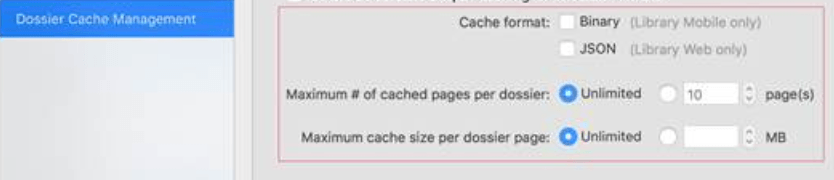
1. Turn individual types of caches ON or OFF - JSON for Web, and Binary for Mobile. (Set to ON by default).
2. Limit the number of pages to be cached per dossier (Set to 10 pages, by default).
3. Limit the cache size per page per dossier. (Set to Unlimited, by default).
With these settings, the admin has the flexibility of allowing the caches to be generated for optimal performance, while governing them to avoid any scalability or memory issues.
If the admin does choose to turn OFF the caches completely for any reason, she can do so in a couple of other ways as well -
1. Turn OFF caching directly from Strategy Developer for the project, and that will turn off the personalized caches as well.
2. Turn OFF the new feature flag introduced for these caches via Web (Preferences > User Preferences > Features for Customer Feedback), and that will turn off the personalized caches as well. The flags are something that allow our customers to leverage and test the latest capabilities with every new release on their environments, while having an option to turn them off at will.

KB40538.
