In Strategy 10.10 a feature was introduced to allow for sharing of personal data import cubes while applying security filters to secure the data. This can be seen in the below two screenshots showing the add data security option and a security filter defined in Web on a Data Import cube.
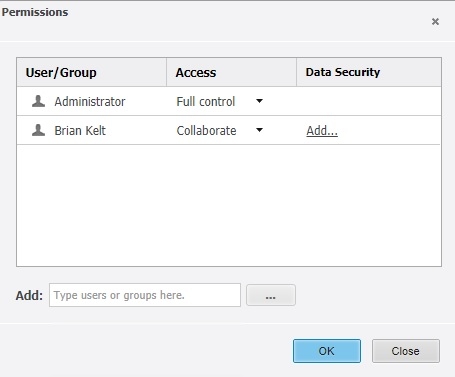

This functionality works by modifying the users security filter automatically, behind the scenes, to add in the additional expression defined in the share screen in Web. The screenshot below shows what shows up in the security filter for the user when examined in Developer.

Now this method of application means there are concerns the environment administrator needs to address before sharing or encouraging use of this feature. With the users main security filter modified this means the new filter will apply anywhere and everywhere a security filter is supposed to apply. This can include regular reports. Usually this isn't a concern as data import cubes use their own set of locally defined managed objects which are not reused elsewhere. Users however can choose to map those Data Import attributes to the main project attributes which will cause all reports to apply the new security filter.
Generally there are two approaches to choose between to handle these sorts of scenarios.
Approach one is to deny ACLs to the security filter objects to regular users. This will prevent them from creating security filters when hitting the share feature but allow them to map to project attributes. This should be done whenever mapping to main project attributes is a key priority as in these scenarios end users should not be allowed to modify the general environments security filters. Security filters will need to be managed by the proper Administrators in this setup as should be done for filters that will apply to an entire environment.
Approach two is to deny modify ACLs to the main project attributes. This will prevent mapping the Data Import project attributes. This will mean all the security filters created through this feature are limited in scope to just the Data Import cube in question. This should be done when new filters on just the Data Import information is a key priority and there is little overlap in the types of information in Data Import and the main project attributes.
The internal reference number for this is KB440617
