Starting in Strategy 10.11 a change is being made to the default value of the use lookup for attributes function parameter when making metrics. This change applies to metric creation in either Developer or Web. This change is being made as the property is to help move the product towards future deprecation of this setting. This setting is being deprecated as it is unnecessary with other options and can cause performance issues with some analytical engine calculations by default. To read up more about what the property does look at the following article.
https://community.Strategy.com/s/article/KB45721-Functions-with-parameter-UseLookupForAttributes-are
With the new default formulas will be changed by Web to not show the parameter in a formula when it is false rather then when true as seen in the below screenshots.
10.10 and earlier:
Count<UseLookupForAttributes=False>(Year@ID){~+}
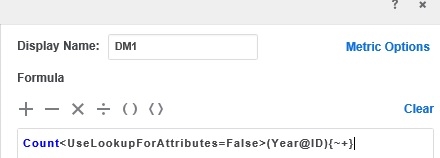
10.11 and above:
Count<UseLookupForAttributes=True>(Year@ID){~+}
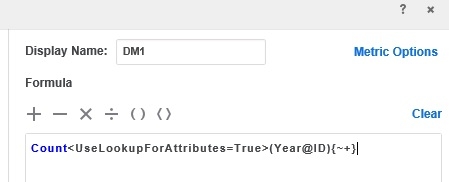
Now in future to workaround the removal of this property there are several other features that can be used instead. The simplest option for Developer created metrics is to use the fact ID parameter to point to a fact which comes from the attributes lookup table or a different table as desired. This will force the use of whatever table is desired be it fact or lookup for calculating the metric based on an attribute.
For Web with derived metrics the option is a little more in depth. In order to have a derived metric that can source from the join of multiple datasets a simple compound metric can be created off of the different source datasets. The formula would look like the below formula where DM1 is the metric based on the attribute from dataset1 and DM2 is the metric based on the attribute from dataset2.
IF(IsNotNull(DM1), DM1, DM2)
The internal reference number for this ticket is KB440642
