EducationSoftwareStrategy.com
StrategyCommunity

Knowledge Base

Product

Community

Knowledge Base

TopicsBrowse ArticlesDeveloper Zone

Product

Download SoftwareProduct DocumentationSecurity Hub

Education

Tutorial VideosSolution GalleryEducation courses

Community

GuidelinesGrandmastersEvents
x_social-icon_white.svglinkedin_social-icon_white.svg
Strategy logoCommunity

© Strategy Inc. All Rights Reserved.

LegalTerms of UsePrivacy Policy
  1. Home
  2. Topics

KB440675: Share option is not visible in editable and presentation mode but available in folder browsing when right mouse click on the document in MicroStrategy Web 10.8


Mengran (Molly) Wang

Senior Cloud Support Engineer III • MicroStrategy


Share option is not visible in editable and presentation mode but available in folder browsing when right mouse click on the document in MicroStrategy Web 10.8 if MicroStrategy Scheduler is not enabled.

SYMPTOM:
Share icon on Menu bar or from Home menu in editable mode and share option in Home menu in presentation mode are not available.

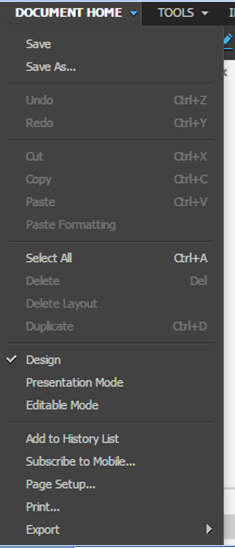
ka02R000000kUwoQAE_0EM44000000WKdp.png


ka02R000000kUwoQAE_0EM44000000WKdu.png

Whereas right mouse click on the document can share successfully:
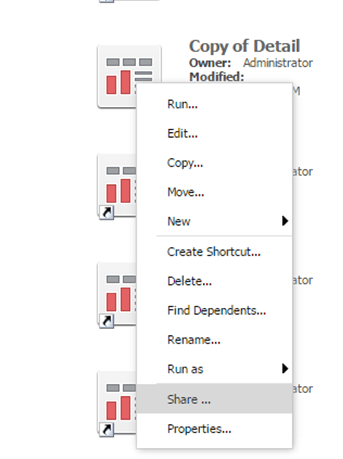
ka02R000000kUwoQAE_0EM44000000WKdz.png

The account being used is administrator, which means all privileges are granted.
CAUSE:
Strategy scheduler is not enabled.
ACTION:
Enable Strategy scheduler in Strategy i-server configuration - Server Definition - Advanced.
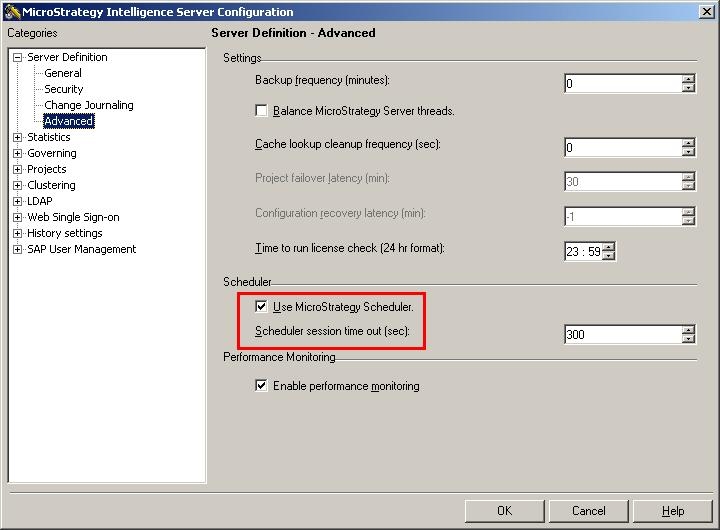
ka02R000000kUwoQAE_0EM44000000WKe4.jpeg

Article Reference Number:  KB440675


Comment

0 comments

Details

Knowledge Article

Published:

April 26, 2018

Last Updated:

January 1, 2019