EducationSoftwareStrategy.com
StrategyCommunity

Knowledge Base

Product

Community

Knowledge Base

TopicsBrowse ArticlesDeveloper Zone

Product

Download SoftwareProduct DocumentationSecurity Hub

Education

Tutorial VideosSolution GalleryEducation courses

Community

GuidelinesGrandmastersEvents
x_social-icon_white.svglinkedin_social-icon_white.svg
Strategy logoCommunity

© Strategy Inc. All Rights Reserved.

LegalTerms of UsePrivacy Policy
  1. Home
  2. Topics

KB440676: Link is not working in bar graph on android phone in MicroStrategy Mobile 10.9


Mengran (Molly) Wang

Senior Cloud Support Engineer III • MicroStrategy


Link is not working in bar graph on android phone in MicroStrategy Mobile 10.9; while working fine in iOS device.

Starting with the release of Strategy ONE (March 2024), dossiers are also known as dashboards.
STEPS TO REPRODUCE:
1. Add a simple grid in document and edit a link onto the attribute to run another document/report.
2. Then convert the grid into bar graph.
3. Run on android. See there is no link available compared with iOS.
iOS:
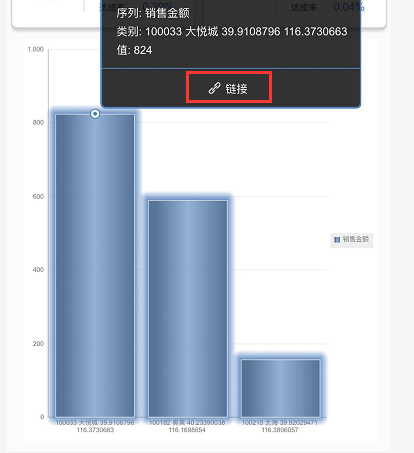
ka0PW0000001JV8YAM_0EM44000000WKeT.png

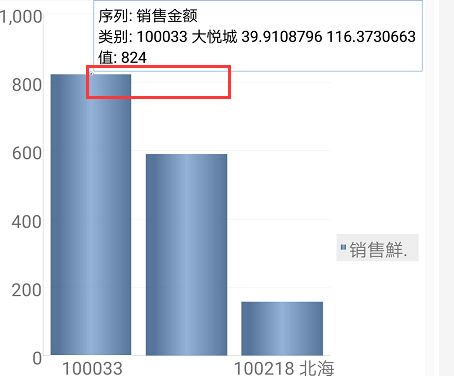
Android:

ka0PW0000001JV8YAM_0EM44000000WKeY.png

CAUSE:
This is a known limitation in Strategy Mobile for Android 10.9. It is not supported linking to other document from graph markers on Android platform or dossier.
ACTION:
Currently this issue is still being reviewed for feasibility by our Technology team and it is not scoped for any upcoming scheduled Strategy release.
Article Reference Number:   KB440676


Comment

0 comments

Details

Knowledge Article

Published:

April 25, 2018

Last Updated:

March 21, 2024