Starting with the release of Strategy ONE (March 2024), dossiers are also known as dashboards.
SUMMARY
Dossiers with Strategy 10.11 will support prompts for end users. By designing dossiers with prompted datasets, end users will now be able to proactively limit the data load prior to running a dossier. This not only allows for dossiers to have personalized information but also improves performance by processing only the necessary data. Analysts can now leverage prompted datasets when creating a dossier in any authoring interface, Strategy Web, Workstation and Desktop, or while consuming from the Strategy Library. Report Services Documents that contain prompts can now be accessed via the Library with an enhanced prompting interface.
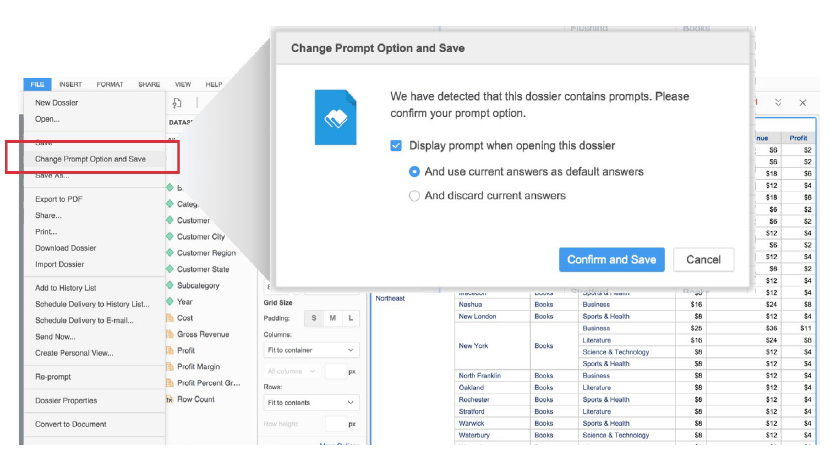
Save prompt options
Similar to Report Services Documents, authors can set the default prompt choices for dossiers and whether or not the prompts should be shown on initial execution.
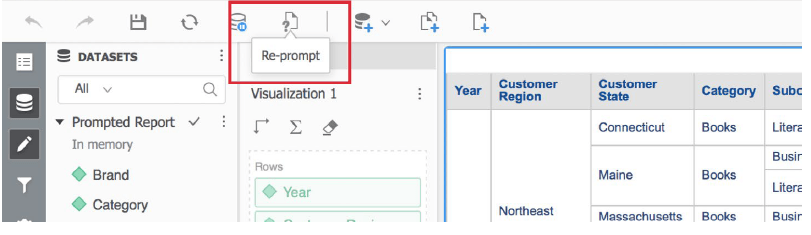
In the Strategy Library, an end user’s prompt selections will be retained each subsequent time the dossier is opened. Saving prompt selections helps end users as they do not need to re-enter their choices each time they run the dossier from the Strategy Library. If users want to change their answers, they can simply click on the “re-prompt” or “reset” buttons, which allow the users to reset the prompt selections as needed.
Article Reference Number: KB440687
