Starting with the release of Strategy ONE (March 2024), dossiers are also known as dashboards.
Starting in Strategy 10.11 it is possible to have split child hierarchy attributes join through a shared fact table rather than through a parent with Data Import Cubes. This can be done by enabling the feature flag "Defect fixes that may impact data, SQL, MDX, CSI" in Web. More about Feature flags can be found in this article.
This feature is best illustrated with an example. Take a Data Import Cube similar to below. "Order Date" and "Ship Date" are both children of the Month attribute (a split hierarchy). Employee is an entirely unrelated attribute.
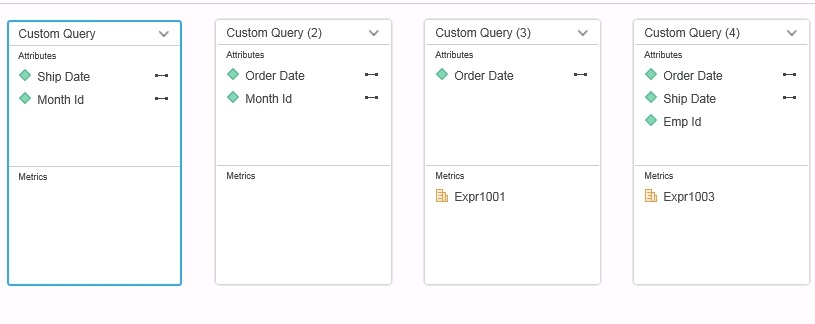
If a Dossier/Document is created that uses the Ship date attribute alongside the Expr1001 metric in versions earlier than 10.11 it would join up through "Custom Query (2)" table to Month and then down to "Ship Date" through "Custom Query" table. This ends up producing extra combinations based on sharing all data for the same Month together. With the new feature flag enabled, the query will join to "Custom Query (4)" table to get data between Order Date and Ship Date. This can improve performance and produces less double counting of data. This can be seen in the below CSI statements generated between the old and new behavior.
Old Behavior
Tables Accessed:
Table4 [REL_MONTH_ID_SHIP_DATE]: Month Id, Ship Date, RELATIONSHIP_TABLE, ONE_TO_MANY
Table5 [REL_MONTH_ID_ORDER_DATE]: Month Id, Order Date, RELATIONSHIP_TABLE, ONE_TO_MANY
Table8 [F_Custom Query (3)71F05796162FEDBE42B3571275927322]: Order Date, Row Count - Custom Query (3), Expr1001, FACT_TABLE
select [Ship Date]@[ship_date],
sum([[F_Custom Query (3)71F05796162FEDBE42B3571275927322].Expr1001])@{[Ship Date]} as [Expr1001]
from MTDI1
with Table Join Tree: [F_Custom Query (3)71F05796162FEDBE42B3571275927322]
Join [REL_MONTH_ID_ORDER_DATE] with output level Tuple([Order Date]@[order_date], [Month Id]@[month_id])
Join [REL_MONTH_ID_SHIP_DATE] with output level Tuple([Order Date]@[order_date], [Ship Date]@[ship_date])
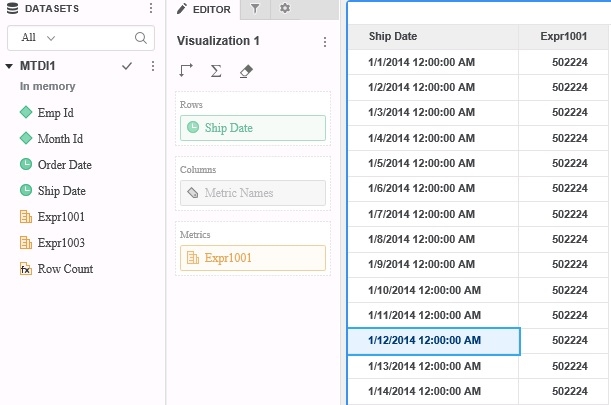
Notice how it uses two relationship tables to join. These relationship tables are generated from Custom Query (1) and Custom Query (2) but require additional analytical work and memory. It also produces data that looks like a cross join as seen in the data below.
New behavior with feature flag enabled.
Tables Accessed:
Table8 [F_Custom Query (3)71F05796162FEDBE42B3571275927322]: Order Date, Row Count - Custom Query (3), Expr1001, FACT_TABLE
Table9 [F_Custom Query (4)71F05796162FEDD372E3782277635392]: Emp Id, Ship Date, Order Date, Row Count - Custom Query (4), Expr1003, FACT_TABLE
select [Ship Date]@[ship_date],
sum([[F_Custom Query (3)71F05796162FEDBE42B3571275927322].Expr1001])@{[Ship Date]} as [Expr1001]
from MTDI1
with Table Join Tree: [F_Custom Query (3)71F05796162FEDBE42B3571275927322]
Join (Set of distinct Tuple([Order Date]@[order_date], [Ship Date]@[ship_date]) where Tuple([Order Date]@[order_date], [Ship Date]@[ship_date]) in [F_Custom Query (4)71F05796162FEDD372E3782277635392]) with output level Tuple([Order Date]@[order_date], [Ship Date]@[ship_date])
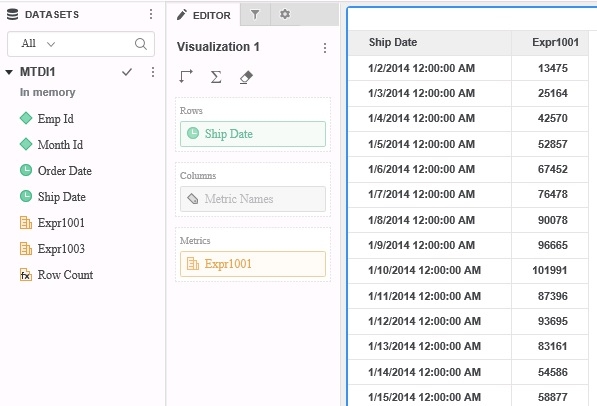
Notice how the tables accessed only hits Custom Query (3) and Custom Query (4). This joins together combinations only if they exist in the fact table and does not produce a cross join of data across months as seen in the data below.
It should be kept in mind that split hierarchies are still not recommended in Strategy as they can cause problems with joins and data integrity. More on that is noted in the below linked article.
KB20144: An attribute’s lookup table is joined to a fact table through the wrong relationship table in MicroStrategy SQL Generation Engine
ACTION
This issue has been addressed in Strategy 10.11.
If you are upgrading to Strategy 11.0 or above, to pick up the fix, enable project level setting "Data Engine Version" to 11. This property can only be enabled through Workstation. For more details on enabling the setting, refer to Change Data Engine Version.
If you are upgrading to Strategy 10.11: To pick up the fix, enable the Feature Flag "Defect fixes that may impact Data, SQL, MDX, CSI" within the Web Preferences -> Project Defaults. For more details on enabling Feature Flags refer to What are the Feature Flag options and what do they accomplish in MicroStrategy Web 10.8 and up. Starting Strategy 11.0, this Feature Flag is removed and replaced with project level setting called "Data Engine Version".
Strategy reference numbers for this technical note are KB440694 and F10385.
