Starting with the release of Strategy ONE (March 2024), dossiers are also known as dashboards.
New Features & Functionality
Pause Mode: New Feature Available with Strategy 10.11
When authoring or editing a dossier, analysts drag and drop data onto the dossier. When data is added to the dossier, it is instantly visualized as a grid or chart. For larger datasets, however, because the dossier executes each time data is added to the dossier, there might be a lag between adding data to a dossier and seeing the new visualizations. This happens each time a new data point is added to the dossier.
What's new with Pause Mode?
With Strategy 10.11, users can pause live queries or dossier execution while adding data to a dossier and prevent the dossier from processing or executing the visualization each time a new data point is added. This allows users to create or edit dossiers without lag, which is particularly important when working with live connections to sources, large datasets, or slow connections. Dossier execution can be resumed once all changes have been made. This also applies to situations when filters need to be modified. Note that the ability to pause and resume dossier execution is available as a button on the menu bar of the dossier authoring interface and is available for Strategy Desktop, Web, and Workstation.
Get started with pause mode
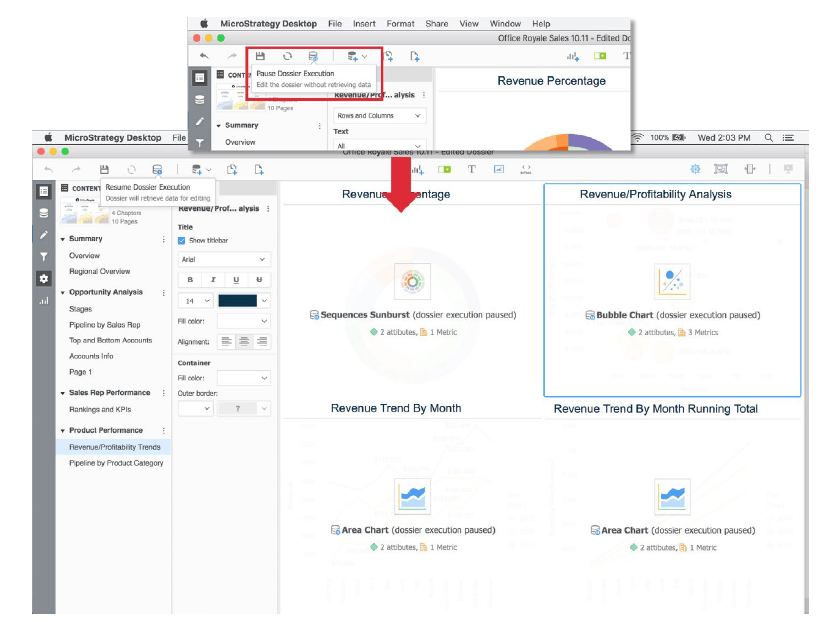
Have other questions? Feel free to start a discussion or reach out to your Support liaison to open a case!
Want to upgrade to Strategy 2019? Visit the Strategy website!
