EducationSoftwareStrategy.com
StrategyCommunity

Knowledge Base

Product

Community

Knowledge Base

TopicsBrowse ArticlesDeveloper Zone

Product

Download SoftwareProduct DocumentationSecurity Hub

Education

Tutorial VideosSolution GalleryEducation courses

Community

GuidelinesGrandmastersEvents
x_social-icon_white.svglinkedin_social-icon_white.svg
Strategy logoCommunity

© Strategy Inc. All Rights Reserved.

LegalTerms of UsePrivacy Policy
  1. Home
  2. Topics

KB440742: On-hover context menu icon is not responsive in the Show Data window in Dossier 10.9


Community Admin

• Strategy


This KB article discusses a cosmetic issue that can be seen in Dossier 10.9. The issue has no consequences and will be fixed in future releases.

Starting with the release of Strategy ONE (March 2024), dossiers are also known as dashboards.
SYMPTOM:
The grid displayed in the Show Data window in Dossier 
STEPS TO REPRODUCE:
1. Show Data:
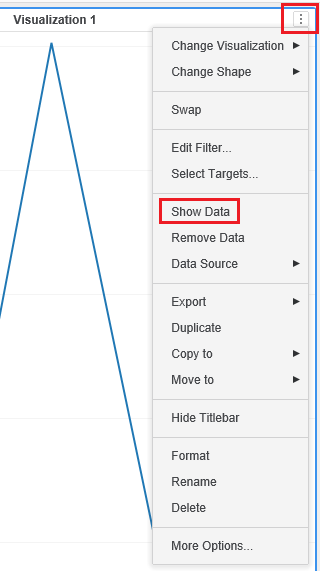
      

ka0PW0000001JQdYAM_0EM44000000WLvp.png

2. Hover over the grid headers and notice the icon for the context menu:
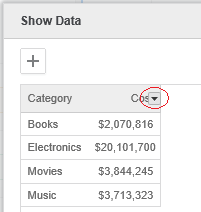
    

ka0PW0000001JQdYAM_0EM44000000WLvu.png

3. click on the on-hover context menu icon and notice nothing happens.
CAUSE:
In previous releases, clicking on the icon would invoke a context menu with sorting ascending/descending options, but at some point the menu stopped appearing.
This is just, however, a cosmetic issue, and sorting ascending/descending is actually possible by single click on the headers.
ACTION:
This issue has been addressed in the Strategy 11.0. Please upgrade to take advantage of the fix when it is released.
Article Reference Number: KB440742


Comment

0 comments

Details

Knowledge Article

Published:

May 3, 2018

Last Updated:

March 21, 2024