EducationSoftwareStrategy.com
StrategyCommunity

Knowledge Base

Product

Community

Knowledge Base

TopicsBrowse ArticlesDeveloper Zone

Product

Download SoftwareProduct DocumentationSecurity Hub

Education

Tutorial VideosSolution GalleryEducation courses

Community

GuidelinesGrandmastersEvents
x_social-icon_white.svglinkedin_social-icon_white.svg
Strategy logoCommunity

© Strategy Inc. All Rights Reserved.

LegalTerms of UsePrivacy Policy
  1. Home
  2. Topics

KB44076: “Cannot save or move object NewPromptAnswer1 with id xxx and type PromptAnswers” informative message received when executing a report after migrating to MicroStrategy Developer 9.4.x-10.x


Stefan Zepeda

Salesforce Solutions Architect • Strategy


Just after migrating to MicroStrategy Developer 9.4.x-10.x, the following informative message appears when executing certain reports

SYMPTOM:
Just after migrating to Strategy Developer 9.4.x-10.x, the following informative message appears when executing certain reports:
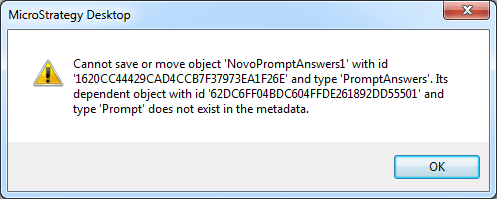
ka02R000000kchWQAQ_0EM440000002ClY.png

CAUSE:
Due to an unknown reason, the answers in the object Prompt are not consistent in the Metadata.  This may have occurred during the migration process.
ACTION:
In order to preserve the Prompt object id and its reference embedded in the definition of other objects, create a similar Prompt object and save over the corrupted Prompt object.
NOTE:
For further information on a similar issue, refer to the Strategy technical note:

  • KB39012: "Error while saving prompt answer: " error message appears when user runs a prompted report that allows saving of personal prompt answers MicroStrategy Web 9.x

Comment

0 comments

Details

Knowledge Article

Published:

April 4, 2017

Last Updated:

April 4, 2017