EducationSoftwareStrategy.com
StrategyCommunity

Knowledge Base

Product

Community

Knowledge Base

TopicsBrowse ArticlesDeveloper Zone

Product

Download SoftwareProduct DocumentationSecurity Hub

Education

Tutorial VideosSolution GalleryEducation courses

Community

GuidelinesGrandmastersEvents
x_social-icon_white.svglinkedin_social-icon_white.svg
Strategy logoCommunity

© Strategy Inc. All Rights Reserved.

LegalTerms of UsePrivacy Policy
  1. Home
  2. Topics

KB440811: When using Negative date values unexpected results are returned in MicroStrategy 10.11 and lower


Community Admin

• Strategy


This Knowledge Base article describes how unexpected results are encountered when using negative date values

Symptom:
When using negative date values by creating subtraction from a date in the metric equation user may encounter unexpected results. This is specific to Strategy 10.11 and lower
Steps to Reproduce:
In Strategy Tutorial, the following metric definition was created:
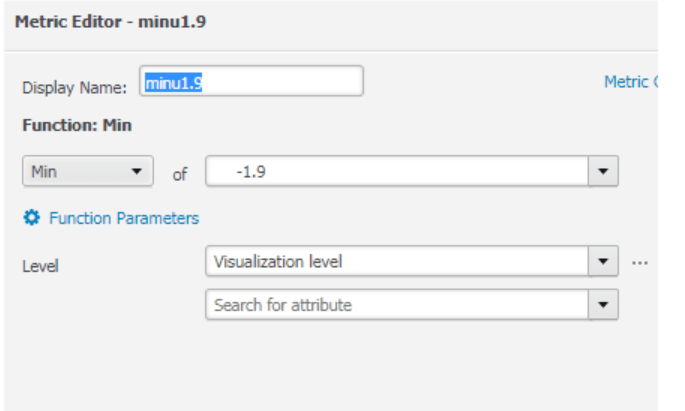
ka04W000000OauEQAS_0EM44000000WNKg.png

Here we can see the results of adding these negative time date in a grid:

ka04W000000OauEQAS_0EM44000000WNL5.png

- minus signs are neglected in my case, e.g. value of 'DerMetricMinus1.05' is equal to 'derMetrPlus1.05'
- numbering starts anew after reaching a round number (an integer), e.g. value of 1.05 when formatted as 'Time' will be equal to hat of 0.05, 2.05, 3.05 etc.
- otherwise, decimal values are calculated correctly, e.g. 0.25 (of a day) will be displayed as 6 hours, 0.05 as 1h12min.
Action:
This issue has been addressed in Strategy 11.x. Upgrade to an applicable version to take advantage of this fix.


Comment

0 comments

Details

Knowledge Article

Published:

May 14, 2018

Last Updated:

December 11, 2018