EducationSoftwareStrategy.com
StrategyCommunity

Knowledge Base

Product

Community

Knowledge Base

TopicsBrowse ArticlesDeveloper Zone

Product

Download SoftwareProduct DocumentationSecurity Hub

Education

Tutorial VideosSolution GalleryEducation courses

Community

GuidelinesGrandmastersEvents
x_social-icon_white.svglinkedin_social-icon_white.svg
Strategy logoCommunity

© Strategy Inc. All Rights Reserved.

LegalTerms of UsePrivacy Policy
  1. Home
  2. Topics

KB440828:Custom formatting with user-defined non English characters cannot be applied on graph visualization in Dossier in MicroStrategy Web 10.11


Shuang Qi

Senior Cloud Support Engineer II • Strategy


Custom formatting with non English characters cannot be applied on graph visualization in Dossier.

Starting with the release of Strategy ONE (March 2024), dossiers are also known as dashboards.
Symptom
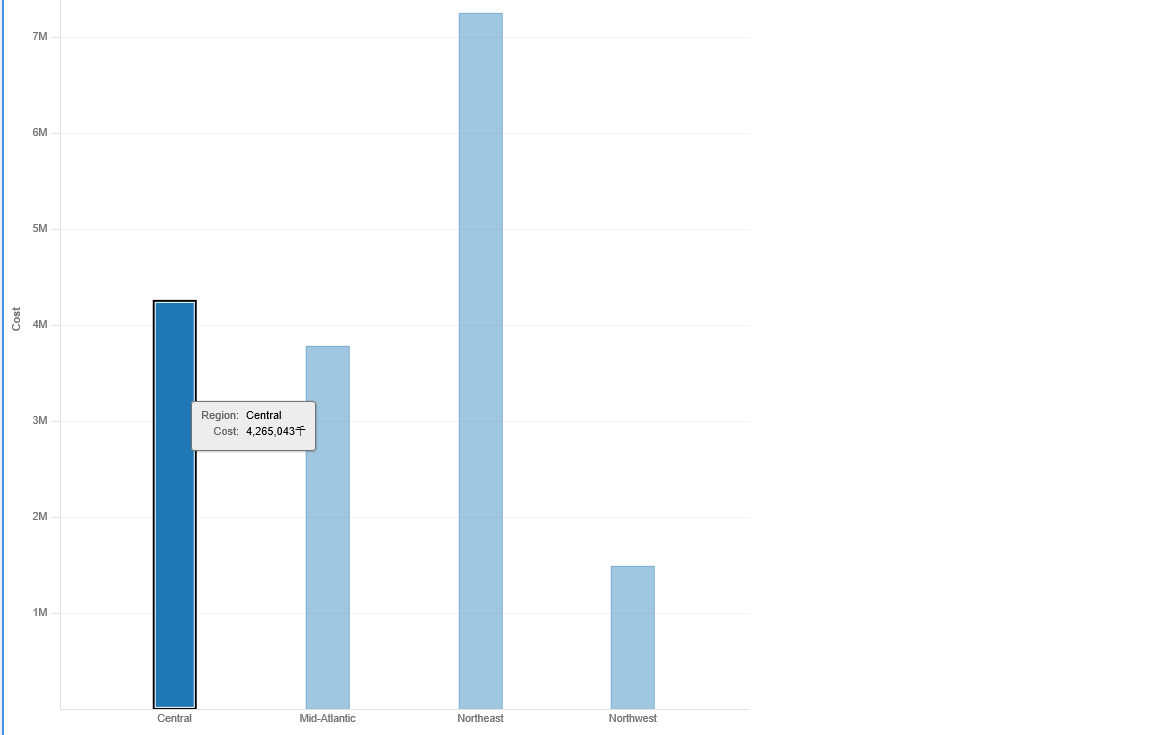
Custom formatting with user-defined non English characters cannot be applied on graph visualization in Dossier. 
Reproduce Steps
1 Create bar graph visualization in dossier. Right click metric axis and select Custom in Number Format. Type a value format within Chinese or Japanese or any other languages expect for English character as below. Here use ‘千’ to present 'thousand' in the screenshot.
  

ka0PW0000001JSzYAM_0EM44000000WNr6.png

 
2 After save this formatting, the number format on the metric didn't take affect while the character applied.
ka0PW0000001JSzYAM_0EM44000000WNrV.png

Cause
This is a known issue in Strategy Web 10.11
Action
Strategy will continue to investigate and post updates as soon as they are available. 
Article Reference Number: KB440828


Comment

0 comments

Details

Knowledge Article

Published:

May 18, 2018

Last Updated:

March 21, 2024