EducationSoftwareStrategy.com
StrategyCommunity

Knowledge Base

Product

Community

Knowledge Base

TopicsBrowse ArticlesDeveloper Zone

Product

Download SoftwareProduct DocumentationSecurity Hub

Education

Tutorial VideosSolution GalleryEducation courses

Community

GuidelinesGrandmastersEvents
x_social-icon_white.svglinkedin_social-icon_white.svg
Strategy logoCommunity

© Strategy Inc. All Rights Reserved.

LegalTerms of UsePrivacy Policy
  1. Home
  2. Topics

KB440833: Undefined error when creating Time Attribute in Visual Insight Dashboard in MicroStrategy 10.4


Caitlin Corrigan

Senior Education Developer • Strategy


This article describes a defect in MicroStrategy 10.4 Hotfix 4 where users are unable to create a derived Time Attribute in Visual Insight and see an undefined error message.

SYMPTOM:
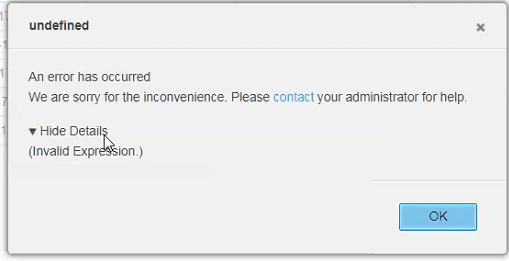
Users should be able to right-click an existing time attribute such as a Date and select “Create Time Attributes” to create derived time attributes at a higher level, such as Year.  When creating some derived time attributes such as “Quarter” or “Week,” users may see the following error:
 

ka02R000000kb31QAA_0EM44000000WNwf.png

“undefined
An error has occurred
We are sorry for the inconvenience. Please contact your administrator for help.”
Under “Show Details”:
“Invalid Expression”
 
STEPS TO REPRODUCE:
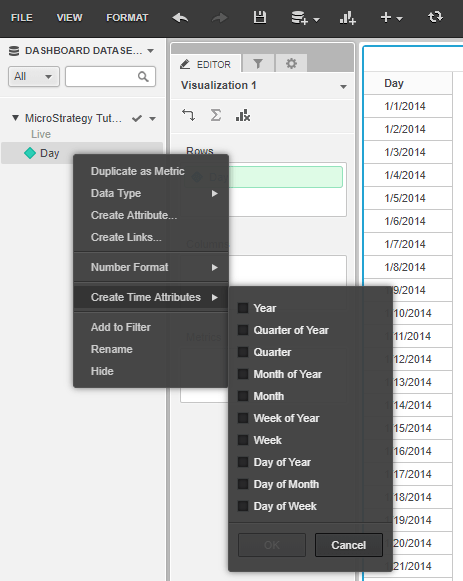
  1. In a Visual Insight dashboard containing a date attribute, right-click the date attribute and select “Create Time Attributes."
ka02R000000kb31QAA_0EM44000000WNwp.png
  1. Select “Quarter” then “OK.”


CAUSE:
This is a known defect in Strategy 10.4 Hotfix 4.
 
ACTION:
This issue has been addressed in 10.4 Hotfix 6 and higher.  Please upgrade to this version or higher to take advantage of this fix.
 
WORKAROUND:
Users can create the derived attributes manually.  For example, Quarter can be created with the following forms and expressions based upon a Date attribute:

  • ID: ((Year(Month@DATE)*10)+Quarter(Month@DATE))
  • DESC: Concat("Q", Quarter(Month@DATE), ", ", Year(Month@DATE))
  • DATE: QuarterStartDate(Month@DATE)


KB440833


Comment

0 comments

Details

Knowledge Article

Published:

May 17, 2018

Last Updated:

December 31, 2018