EducationSoftwareStrategy.com
StrategyCommunity

Knowledge Base

Product

Community

Knowledge Base

TopicsBrowse ArticlesDeveloper Zone

Product

Download SoftwareProduct DocumentationSecurity Hub

Education

Tutorial VideosSolution GalleryEducation courses

Community

GuidelinesGrandmastersEvents
x_social-icon_white.svglinkedin_social-icon_white.svg
Strategy logoCommunity

© Strategy Inc. All Rights Reserved.

LegalTerms of UsePrivacy Policy
  1. Home
  2. Topics

KB440871: Unrecognized attribute ‘requestValidationMode’ error appears when starting MicroStrategy web applications like Web or Mobile on ASP.NET server


Community Admin

• Strategy


This Knowledge Base article describes issue where starting MicroStrategy web applications might result in a specific error message coming from the server. Relaunching the application might result in further detailed message shown in the Symptom section. The issue is a known configuration error.

SYMPTOM
When a user starts Strategy Mobile (or Web) he might see a message saying:
‘A process serving application pool 'Strategy Mobile Pool' failed to respond to a ping’
If the ASP server is restarted the user will see the following error message:
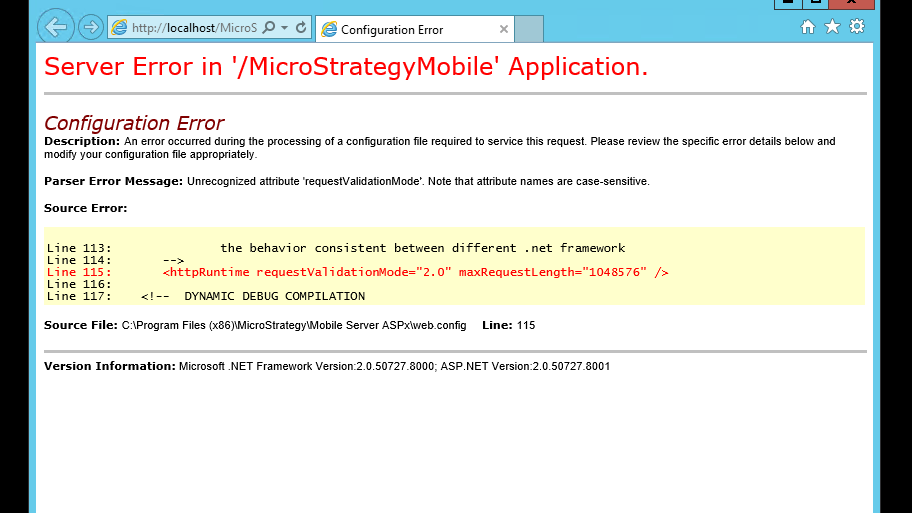
ka04W000000OawfQAC_0EM44000000WOsF.png

CAUSE
The issue is caused by incorrect version of .NET selected for the given application pool. For example: Strategy 10.4 and requires .NET version of at least 4.0. Please check the exact requirements in product’s readme file.
ACTION
To avoid this issue from happening, please do the following:
• Verify .NET version required for your product
• Access IIS manager
• Access Application pool
• Identify the component that throws the error message
• For the .NET CLR version please select appropriate .NET version
• Restart the server
  KB440871


Comment

0 comments

Details

Knowledge Article

Published:

June 26, 2018

Last Updated:

December 31, 2018