EducationSoftwareStrategy.com
StrategyCommunity

Knowledge Base

Product

Community

Knowledge Base

TopicsBrowse ArticlesDeveloper Zone

Product

Download SoftwareProduct DocumentationSecurity Hub

Education

Tutorial VideosSolution GalleryEducation courses

Community

GuidelinesGrandmastersEvents
x_social-icon_white.svglinkedin_social-icon_white.svg
Strategy logoCommunity

© Strategy Inc. All Rights Reserved.

LegalTerms of UsePrivacy Policy
  1. Home
  2. Topics

Trend charts do not display when exporting Smart KPI Widget to PDF from Workstation 10.11


Diqing Shen

Senior Manager, Cloud Support • MicroStrategy


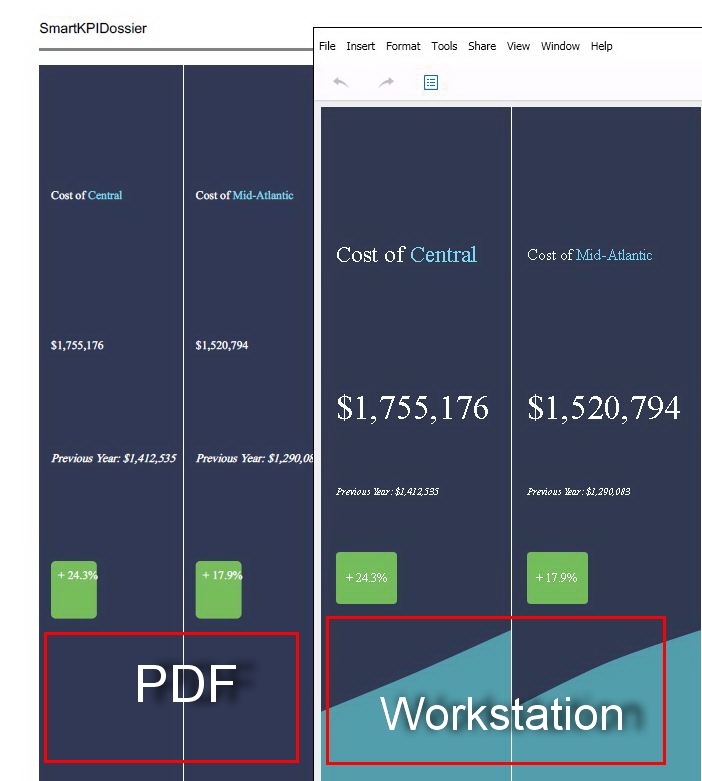
Within MicroStrategy 2019, some of our users have been experiencing difficulties when exporting dossiers to PDF. Specifically, the Smart KPI widget will not show the trend chart during the exporting process. The user will build the dossier and export the PDF from Workstation. However, when opening the final PDF, the KPI Widget will not appear as it did within dossier--missing the trend line. Get started with next steps!

Starting with the release of Strategy ONE (March 2024), dossiers are also known as dashboards.
Problem
Within Strategy 2019, some of our users have been experiencing difficulties when exporting dossiers to PDF. Specifically, the Smart KPI widget will not show the trend chart during the exporting process. The user will build the dossier and export the PDF from Workstation. However, when opening the final PDF, the KPI Widget will not appear as it did within dossier--missing the trend line.
Steps to reproduce
 

  1. Open Strategy Workstation.
  2. Choose New Dossier.
  3. Create new visualizations, of which one will be a Smart KPI Widget.
  4. Ensure the KPI widget uses the trend line, or comparison over time.
  5. Got to File > Export to PDF. 
  6. Located the PDF on your computer.
  7. Open the PDF.
  8. Note the trend line for the Smart KPI does not appear as show below:
ka0PW0000001JVIYA2_0EM44000000WQ3n.jpeg

Why is this happening?
This is a known issue in Strategy Workstation 10.11.
The issue has been resolved by the Strategy development team.
Solution
This issue has been resolved in Strategy 2019. Please feel free to upgrade to Strategy 2019 or newer to take advantage of this fix.
Have other questions? Feel free to start a discussion or reach out to your Support liaison to open a case!
 
Want to upgrade to Strategy 2019? Visit the Strategy website!


Comment

0 comments

Details

Knowledge Article

Published:

May 31, 2018

Last Updated:

March 21, 2024