EducationSoftwareStrategy.com
StrategyCommunity

Knowledge Base

Product

Community

Knowledge Base

TopicsBrowse ArticlesDeveloper Zone

Product

Download SoftwareProduct DocumentationSecurity Hub

Education

Tutorial VideosSolution GalleryEducation courses

Community

GuidelinesGrandmastersEvents
x_social-icon_white.svglinkedin_social-icon_white.svg
Strategy logoCommunity

© Strategy Inc. All Rights Reserved.

LegalTerms of UsePrivacy Policy
  1. Home
  2. Topics

Exporting a Dossier with Mapbox Visualization to PDF Renders a Blank PDF in Workstation 10.11


Diqing Shen

Senior Manager, Cloud Support • MicroStrategy


Within MicroStrategy Workstation 10.11, some of our users have been experiencing difficulties when exporting a dossier to PDF. Specifically the users are having difficulty exporting Mapbox visualizations. When the using attempts to export a dossier that contains a Mapbox visualization to PDF, the PDF will be blank. Continue reading to get more information!

Starting with the release of Strategy ONE (March 2024), dossiers are also known as dashboards.
Troubleshooting
Exporting a Dossier with Mapbox Visualization to PDF Renders a Blank PDF in Workstation 10.11
Within Strategy Workstation 10.11, some of our users have been experiencing difficulties when exporting a dossier to PDF. Specifically the users are having difficulty exporting Mapbox visualizations. When the using attempts to export a dossier that contains a Mapbox visualization to PDF, the PDF will be blank. Continue reading to get more information!
Steps to reproduce
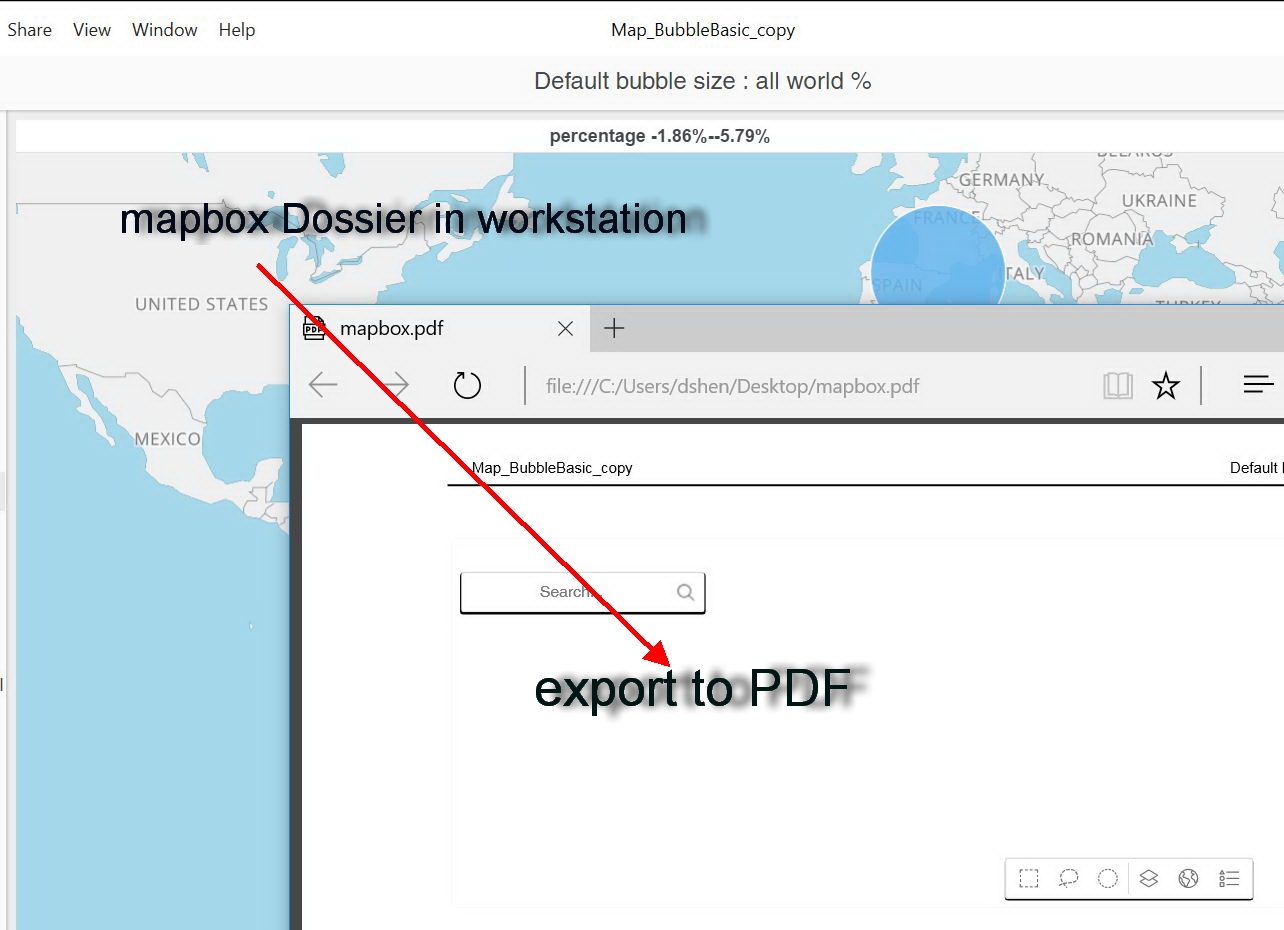
  1. Go to Strategy Workstation.
  2. Choose New Dossier.
  3. Create new visualizations. Include the Mapbox visualization.
  4. Choose File > Export to PDF to export the dossier with the Mapbox.
  5. Locate the exported PDF in your downloads.
  6. Open the PDF.
  7. Notice that the PDF is blank.
ka0PW0000001JQPYA2_0EM44000000WQTv.jpeg

Why is this happening?
This is a known issue in Strategy Workstation 10.11. The Strategy Development has resolved this issue.
Please feel free to upgrade to take advantage of this fix. 
 Status
ACKNOWLEDGED   IN-PROGRESS   SOLVED   (Version: 10.4.5+, Strategy 2019)
Next Steps
This issue will be addressed in the Strategy Feature Release scheduled to be released in Q3 2018.
Please feel free to upgrade to this version to take advantage of the fix. 
 
Have other questions? Feel free to start a discussion or reach out to your Support liaison to open a case!
 
Want to upgrade to Strategy 2019? Visit the Strategy website!


Comment

0 comments

Details

Knowledge Article

Published:

June 4, 2018

Last Updated:

March 21, 2024