EducationSoftwareStrategy.com
StrategyCommunity

Knowledge Base

Product

Community

Knowledge Base

TopicsBrowse ArticlesDeveloper Zone

Product

Download SoftwareProduct DocumentationSecurity Hub

Education

Tutorial VideosSolution GalleryEducation courses

Community

GuidelinesGrandmastersEvents
x_social-icon_white.svglinkedin_social-icon_white.svg
Strategy logoCommunity

© Strategy Inc. All Rights Reserved.

LegalTerms of UsePrivacy Policy
  1. Home
  2. Topics

Object Search Does Not Return Any Results in Workstation 10.11


Diqing Shen

Senior Manager, Cloud Support • MicroStrategy


Within MicroStrategy Workstation 10.11, some of our users have been experiencing difficulties using the Object Search. The object search bar appears in the top right bar of the Workstation window. When the user is connected to the environment and they use the Object Search, they will notice that the results only show when the object shows in folder where the user currently performs the search. Learn more with this article!

Starting with the release of Strategy ONE (March 2024), dossiers are also known as dashboards.
Description

Within Strategy Workstation 10.11, some of our users have been experiencing difficulties using the Object Search. The object search bar appears in the top right bar of the Workstation window. When the user is connected to the environment and they use the Object Search, they will notice that the results only show when the object shows in folder where the user currently performs the search. Learn more with this article!


Steps to reproduce
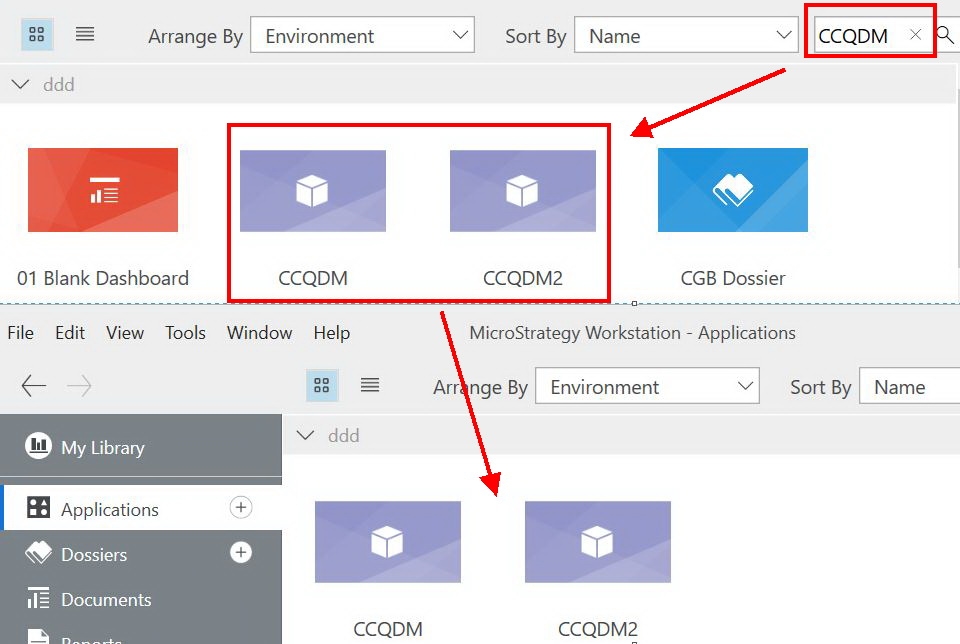
 

  1. Open Strategy Workstation.
  2. Log into an environment with your credentials.
  3. View all the dossiers within the Applications or Workstation.
  4. Go to the Object Search in the top right search bar.
  5. Search for an object not located within the current folder.
  6. View the results for the search. Objects in other folders will not appear.


ka0PW0000001JQ7YAM_0EM44000000WPkH.jpeg


  1. When doing the same search action from another folder in same environment, no results return. 


  • See the image below.


ka0PW0000001JQ7YAM_0EM44000000WPkR.jpeg


Why is this happening?

This is a known issue in Strategy Workstation 10.11. More recent versions of Strategy have solved this issue and offer the ability to use the Object Search across all folders within the environment. Continue on for next steps!


Solution

Make sure to check back with this KB article later to get all the latest updates!
 
Have other questions? Feel free to start a discussion or reach out to your Support liaison to open a case!

Want to upgrade to Strategy 2019? Visit the Strategy website!


Comment

0 comments

Details

Knowledge Article

Published:

May 30, 2018

Last Updated:

March 21, 2024