Starting with the release of Strategy ONE (March 2024), dossiers are also known as dashboards.
SYMPTOM:
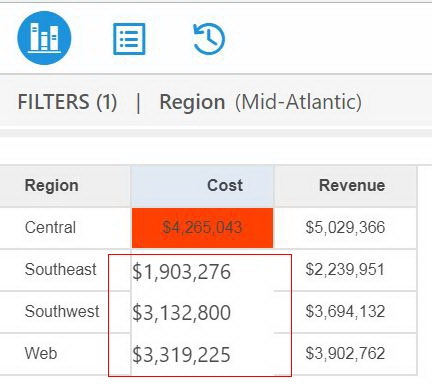
Dossier format gets broken when updating filter condition after using 'go to target' option in Strategy Library 10.11
STEPS TO REPRODUCE:
1. Create a Dossier with grid visualization with Region, Cost, Revenue in Page 1, and Region, Cost and Profit in Page 2.
2. In the Context Menu in Page 1, click Select Targets, and set Page 2 as target.
3. Add Region in the filter panel, check some regions. Apply a threshold for Cost.
4. Run the Dossier in Library, right click on Cost and choose Go to Targets (Page 2):
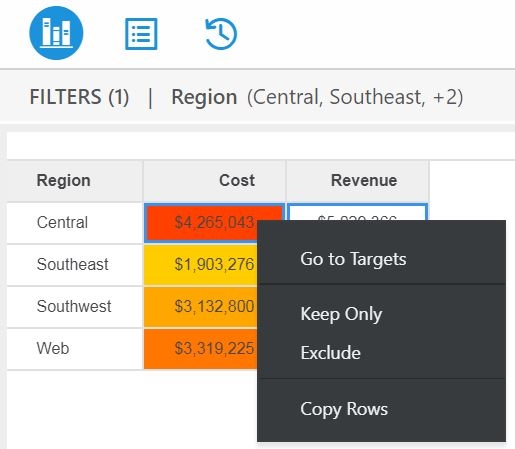
5. From Table of Contents, go back to Page 1, clear the existing filter and apply some other Regions for the filter, note that the grid in Page 1 gets broken.
CAUSE:
This is a known issue in Strategy Library 10.11
ACTION:
Currently this issue is still being reviewed for feasibility by our Technology team and it is not scoped for any upcoming scheduled Strategy release.
Article Reference Number KB441018
