EducationSoftwareStrategy.com
StrategyCommunity

Knowledge Base

Product

Community

Knowledge Base

TopicsBrowse ArticlesDeveloper Zone

Product

Download SoftwareProduct DocumentationSecurity Hub

Education

Tutorial VideosSolution GalleryEducation courses

Community

GuidelinesGrandmastersEvents
x_social-icon_white.svglinkedin_social-icon_white.svg
Strategy logoCommunity

© Strategy Inc. All Rights Reserved.

LegalTerms of UsePrivacy Policy
  1. Home
  2. Topics

KB441061: "StartUpManager::StartUpManager(): LoadServerDef failed. Return Code: 0x8004102D" is seen when configuring MicroStrategy Intelligence Server


Community Admin

• Strategy


The following knowledge base article describes one possible cause of the error message "StartUpManager::StartUpManager(): LoadServerDef failed. Return Code: 0x8004102D". A solution is provided.

SYMPTOM
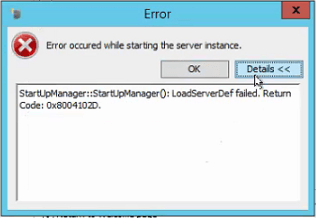
After configuration of the Intelligence Server via Configuration Wizard, during the Intelligence Server start, the following error interrupts the process: 


StartUpManager::StartUpManager(): LoadServerDef failed. Return Code: 0x8004102D.
ka04W000000OaxNQAS_0EM44000000WTeN.png

CAUSE
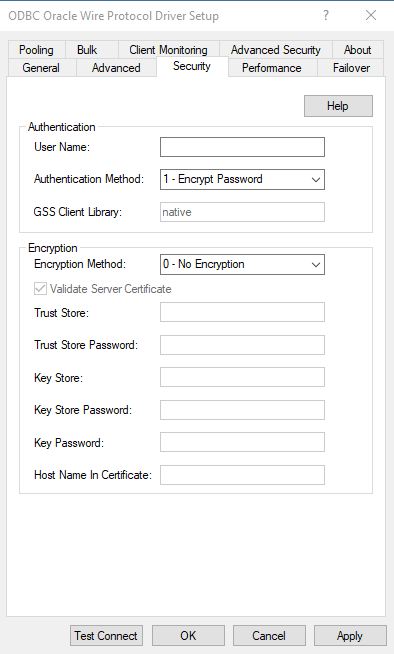
One possible cause of this issue is a configuration issue on the Authentication Method within the DSN. Security is incorrectly set to "Kerberos" when Kerberos is not being used to authentication to the database.
ACTION
On Windows using the ODBC Administrator configure the DSN being used by the Intelligence Server to use "Encrypt Password" as the Authentication Method rather than Kerberos in the Security settings.
ka04W000000OaxNQAS_0EM44000000WTgY.png

Once the Authentication Method is set, restart the Intelligence Server to apply the DSN changes and proceed with the Intelligence Server Configuration.
KB441061


Comment

0 comments

Details

Knowledge Article

Published:

June 29, 2018

Last Updated:

January 3, 2019