EducationSoftwareStrategy.com
StrategyCommunity

Knowledge Base

Product

Community

Knowledge Base

TopicsBrowse ArticlesDeveloper Zone

Product

Download SoftwareProduct DocumentationSecurity Hub

Education

Tutorial VideosSolution GalleryEducation courses

Community

GuidelinesGrandmastersEvents
x_social-icon_white.svglinkedin_social-icon_white.svg
Strategy logoCommunity

© Strategy Inc. All Rights Reserved.

LegalTerms of UsePrivacy Policy
  1. Home
  2. Topics

KB441066: In Box Plot Visualization in Dossier on MicroStrategy Web 10.11, attributes are not sorted correctly after swapping the vertical and horizontal axis.


Community Admin

• Strategy


This article describes about how the Box Plot visualization renders properly when changing metric to attribute by using Prepare/Wrangle Dataset compared to using "Duplicate as Attribute" on metric directly on Dossier.

Starting with the release of Strategy ONE (March 2024), dossiers are also known as dashboards.
SYMPTOM:
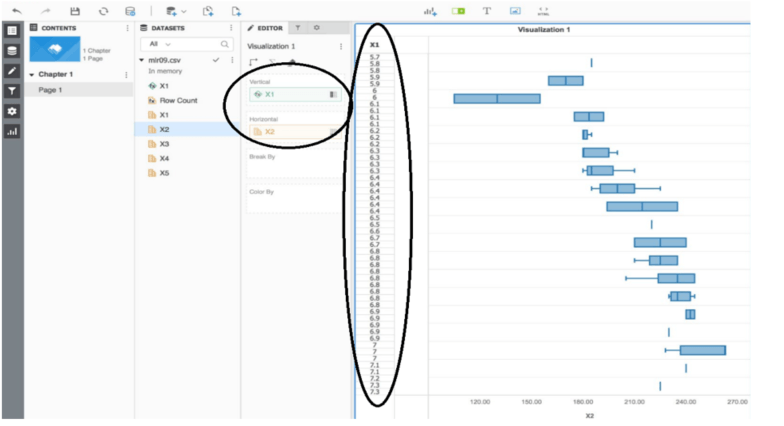
In a Box Plot Visualization in Dossier on Strategy version 10.11, attributes are not always sorted correctly when the user swaps the horizontal and vertical axis if changing a metric to attribute directly using by “Duplicate as Attribute” in Dossier.
STEPS TO REPRODUCE:
  1. Import the simple dataset (i.e. Excel) that has two variables X1, X2, etc with the decimal numbers as metrics and select the Box Plot visualization from the Gallery on Dossier.
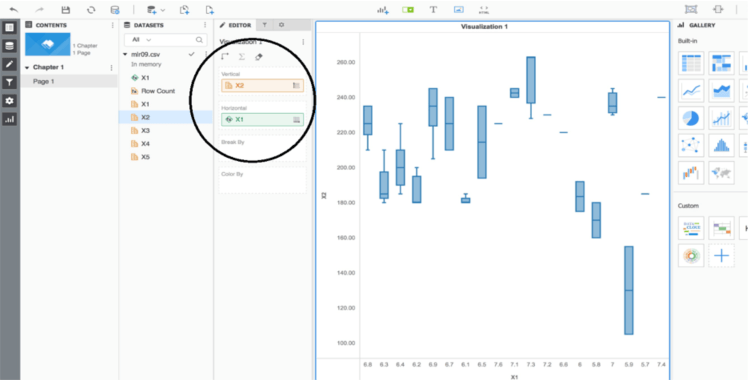
  2. Right click on one of the numeric value, X1 and select “Duplicate as Attribute” and drag it to the Horizontal for Box Plot as shown below:
ka0PW0000001JRpYAM_0EM44000000WTfQ.png


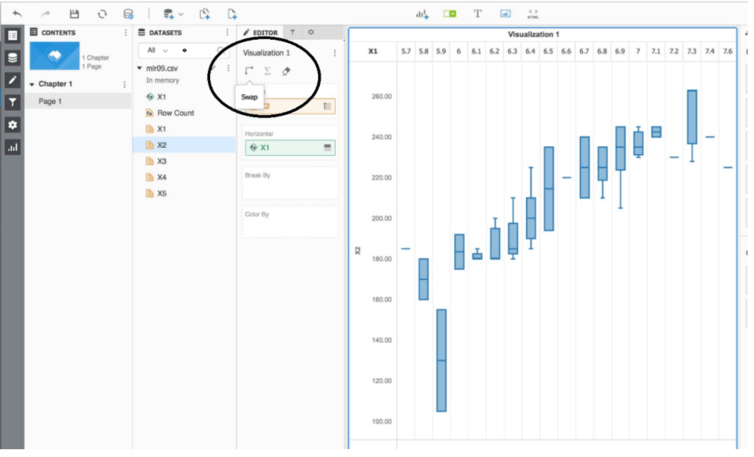
  1. Swap the axis in the Editor tab.
ka0PW0000001JRpYAM_0EM44000000WTfa.png


  1. If attempt to swap again, attribute will be sorted incorrectly.
ka0PW0000001JRpYAM_0EM44000000WTfk.png

CAUSE:
This is a limitation with graph type solely made for the data. In order to use the Visualization correctly, users need to use another tool beforehand such as Data Wrangling. This can possibly be the enhancement request for the future release. 
WORKAROUND:
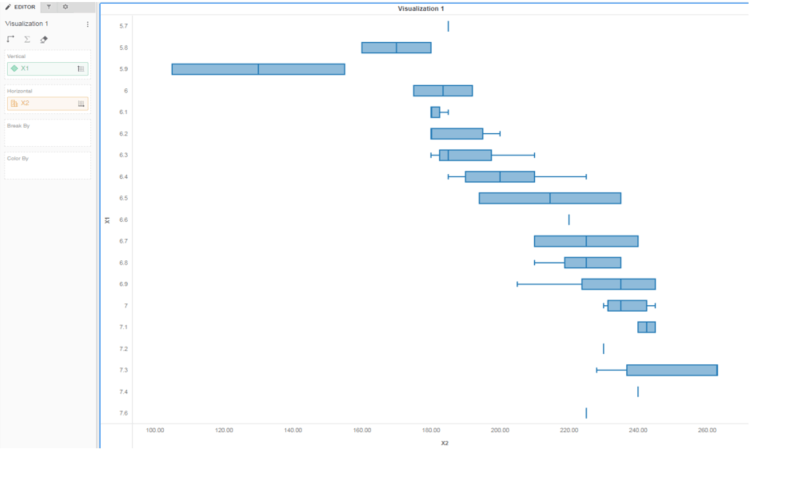
     1. Instead of changing X1 to “Duplicate as Attribute”, go to Edit Dataset or Prepare/Wrangle data before importing to Dossier.
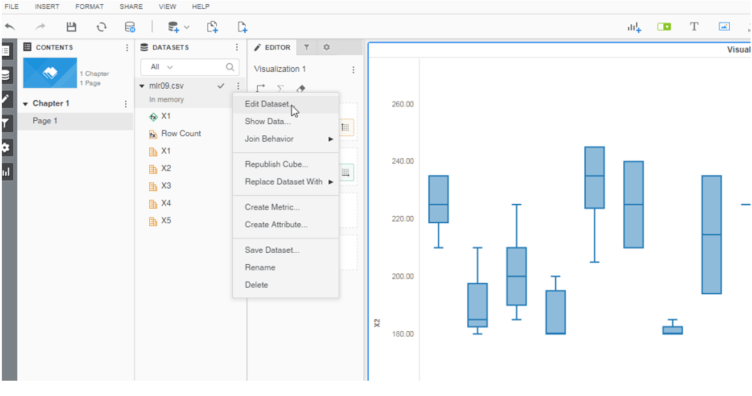
ka0PW0000001JRpYAM_0EM44000000WTfu.png

       2. Convert to Attribute and Update Dataset
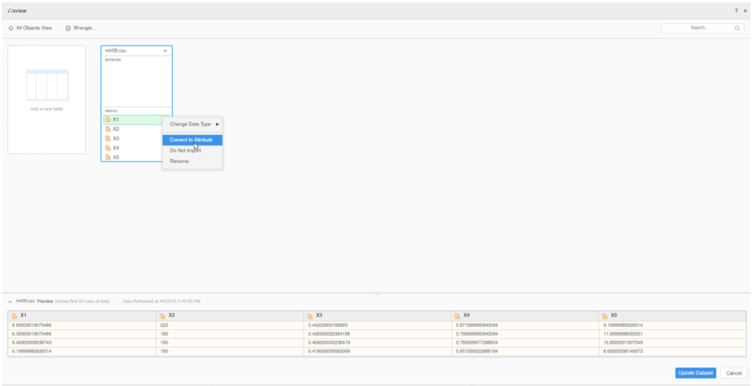
ka0PW0000001JRpYAM_0EM44000000WTgE.png

       3. Regardless of swap, attribute/data will be sorted correctly
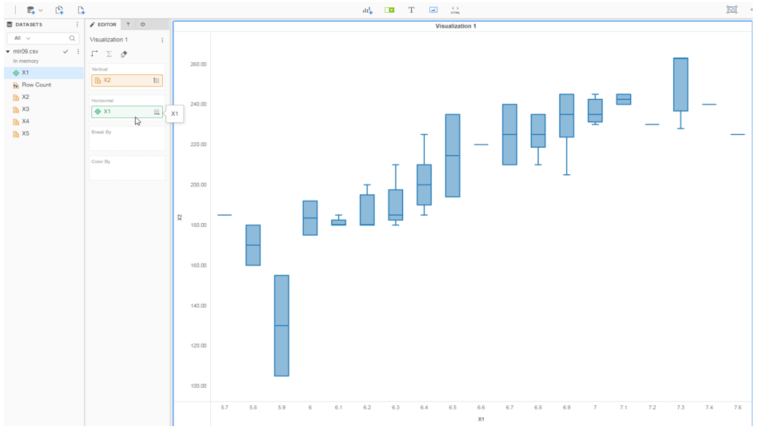
ka0PW0000001JRpYAM_0EM44000000WTgJ.png
ka0PW0000001JRpYAM_0EM44000000WTgO.png

  The Strategy Internal Reference Number for this article is KB441066.


Comment

0 comments

Details

Knowledge Article

Published:

June 27, 2018

Last Updated:

March 21, 2024