SYMPTOM:
In Strategy Web 9.3.x, users can enabled Outline Mode on a grid on a report services document by clicking on the Outline Mode toolbar icon, like shown in the screenshot below:
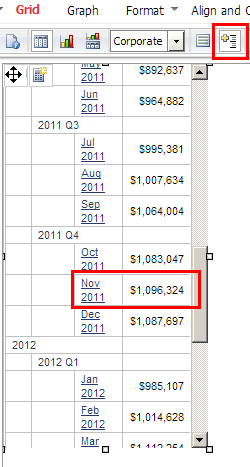
Notice that in this example, Outline Mode is enabled and the row for Nov 2011 shows a metric value of $1,096,324.
Users may then choose to export this report services document to Excel with Formatting. However, after doing so, users may observe that some rows appear missing. For example, in the screenshot below, the row for Nov 2011 is now missing:
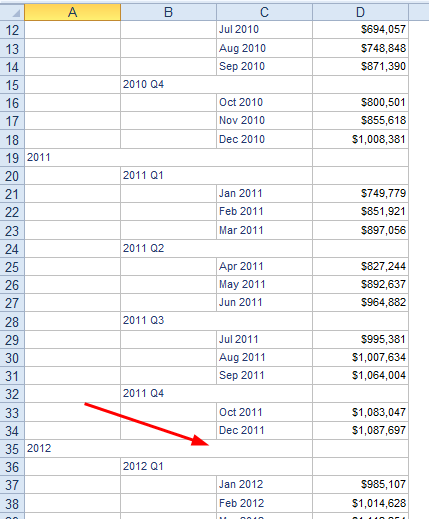
This occurs irrespective of the version of Excel to which the user is exporting to.
CAUSE:
This is a known issue with Strategy Web 9.3.x. Currently the row height supported is of type double; the default value is 13.2. But the height of the cell is in pixels, so it gets truncated to 13. The issue happens because in outline mode, the cell height is used to update the position of the cell. Since it is being truncated there will be accumulated error.
ACTION:
This issue has been addressed in Strategy Web 9.4.0. Upgrade to this version to take advantage of the fix.
WORKAROUND:
Disable Outline Mode on the grid, or export the grid from the underlying report, not from the report services document.
