SUMMARY
This knowledge base article provides the required setting changes to allow the Enterprise Manager service to automatically restart after encountering a crash in the Enterprise Manager Data Loader service process.
ACTION
Instructions for Windows Operating Systems:
1. Navigate to Windows Services
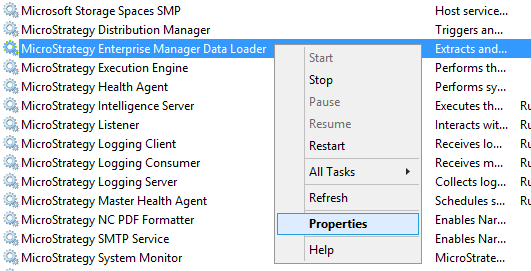
2. Locate the Strategy Enterprise Manager Data Loader service
3. Right click on the service and select 'Properties.'
4. On the 'Recovery' tab, select 'Restart Service' in the drop-down menus for 'First Failure,' 'Second Failure' and 'Subsequent Failures.'
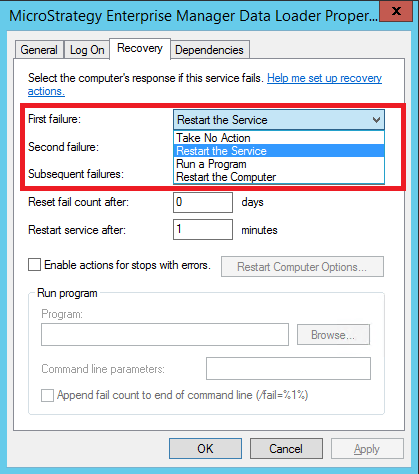
5. Click OK and restart the Enterprise Manager Data Loader service after making this change.
Instructions for Linux Operating Systems:
1. Navigate to the Strategy installation home folder (e.g. /var/opt/Strategy)
2. Create a backup of the file MSIReg.reg
3. Edit the MSIReg.reg file and add the following string to the file:
[HKEY_LOCAL_MACHINE\SOFTWARE\MicroStrategy\Server Control\Servers\EMService\Default]
"RestartIfProcessUnexpectedlyQuit"=dword:00000001
