EducationSoftwareStrategy.com
StrategyCommunity

Knowledge Base

Product

Community

Knowledge Base

TopicsBrowse ArticlesDeveloper Zone

Product

Download SoftwareProduct DocumentationSecurity Hub

Education

Tutorial VideosSolution GalleryEducation courses

Community

GuidelinesGrandmastersEvents
x_social-icon_white.svglinkedin_social-icon_white.svg
Strategy logoCommunity

© Strategy Inc. All Rights Reserved.

LegalTerms of UsePrivacy Policy
  1. Home
  2. Topics

KB441095:Exporting a Dashboard to blank cells to excel and applying a formula return #VALUE


Community Admin

• Strategy


This Knowledge Base article describes how when exporting blank cells to excel some users may be returned the #VALUE when trying to apply a formula

SYMPTOM
When exporting dashboard visualization to excel of a report containing a blank value when adding a formula expression to the cell users may notice a #VAULE message being returned.
STEPS TO REPRODUCE
Found in 10.4 HotFix 7:
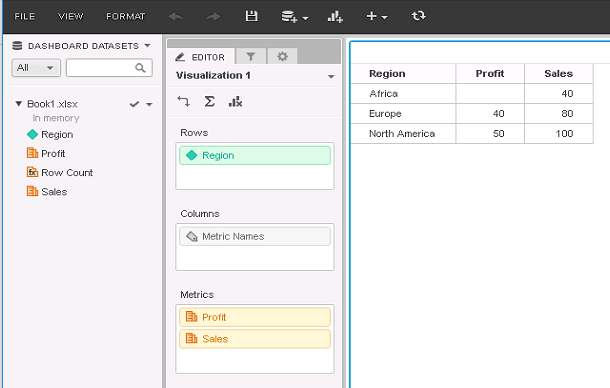
1. Create a data set with at least one blank value as shown below:
ka04W000000OaxcQAC_0EM44000000WUIc.png

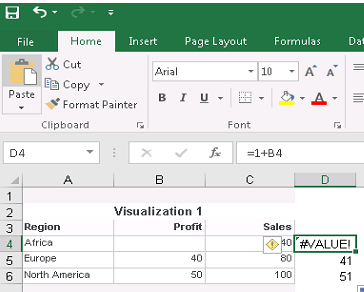
2. Export the visulasation to excel from 10.4 HF7
3. Try adding a formula to the blank value notice the #VALUE is returned
ka04W000000OaxcQAC_0EM44000000WUIm.png

CAUSE 
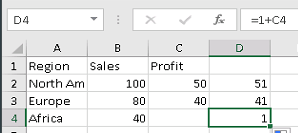
This change in behavior was brought by alteration in the new export engine. Below it is shown the issue is not encountered when exporting the same visulasation to excel with Strategy 10.4 no hotfix
ka04W000000OaxcQAC_0EM44000000WUIr.png

ACTION
Currently this issue is being reviewed by Strategy for a potential code fix on an upcoming Strategy release. KB441095


Comment

0 comments

Details

Knowledge Article

Published:

June 25, 2018

Last Updated:

January 25, 2019